The apps directory
A manifest file you keep under version control proposes a draft, a person publishes it, and deleting the file proposes the server's removal.
- Who
- You, as the operator who owns the files, and a person who publishes
- Where
- A terminal and your repository, and the console or strazactl to publish
- Profile
- Standalone and enterprise
On this page
strazad watches one directory. When a manifest file appears there, or changes, it becomes a draft. A file that goes becomes a draft that removes its server. Each draft waits for a person, who publishes or discards it, so a file never installs, changes or removes a server by itself, and Straza never writes, moves or deletes a file in the directory. strazad reads the directory once a second and compares each file by the fingerprint of its content. Polling works on every filesystem and with every editor, including where change notifications fail.
Before you start
- Write access to the directory, on the machine or volume strazad reads it from.
- A login of a person who may install MCP servers, such as a holder of
straza-adminorstraza-global-mcp-admin. Only a person publishes a draft, and an admin API token cannot.
Find the directory
apps.dirin the config file, orSTRAZA_APPS_DIRin the environment, names the directory. By default it isappsunder the data directory, and strazad creates it at boot. The watcher runs on every boot and cannot be turned off, so a deployment that does not use it keeps an empty directory. The boot log names the resolved path. With the data directory left at its default ofdata, the path is relative to the server’s working directory:{"time":"2026-09-28T20:08:26.198971261Z","level":"INFO","msg":"apps GitOps watcher ready","dir":"data/apps"}The container image
ghcr.io/strazahq/strazasets the data directory to/var/lib/straza, so there the directory is/var/lib/straza/apps. The Helm chart mounts it at/etc/straza/apps. Only files ending in.yamlor.ymldirectly in the directory are read, and subdirectories and other files are ignored.Write a manifest
CLI onlyThe file and its checks live in your repository and your terminal.
The file name is yours, and the server’s name comes from
metadata.name. Replace the address with your MCP server’s. On the demo stack,http://demo-tools:3001/mcpreaches its demo server. Validate the file where you write it, and in your repository’s checks, with the same parser strazad runs:cat > gitops-tools.yaml <<'EOF' apiVersion: straza.dev/v1beta1 kind: App metadata: name: gitops-tools description: MCP server kept in git and proposed from the apps directory server: name: gitops-tools version: "1" straza: runtime: kind: remote remote: url: https://mcp.example.com/mcp exposure: tools: ["*"] EOF strazactl spec validate app -f gitops-tools.yamlYou should see
gitops-tools.yaml: app OKKeep secrets out of the file. A file that holds a secret-shaped value is refused, and the server’s secret belongs in a stored credential, as Credentials shows.
strazactl drafts check -f gitops-tools.yamlsends the file to strazad and prints the verdict its draft would get, storing nothing.Copy it into the directory
CLI onlyA file reaches the directory from a shell, a container command or the Helm chart.
On a host install, copy the file into the directory that the boot log named. strazad runs as its own user, so the file must be readable by that user:
cp gitops-tools.yaml /path/to/apps/The container image has no shell and runs strazad as the unprivileged user 65532.
docker cpwrites the file as root and keeps its mode, so make it readable by everyone first. The demo stack names its strazad containerstraza-eval-strazad-1. Put your own container’s name in its place:chmod 644 gitops-tools.yaml docker cp gitops-tools.yaml straza-eval-strazad-1:/var/lib/straza/apps/gitops-tools.yamlWith the Helm chart, you copy nothing. The chart’s
apps.manifestsvalue takes one entry per file, with the file name as the key and the manifest as the value. The chart renders them into a ConfigMap, mounts it read-only at/etc/straza/appsand pointsSTRAZA_APPS_DIRthere. Ahelm installorhelm upgradetherefore leaves drafts to publish, not live servers, and removing an entry proposes the removal of its server.Read and publish the draft
Within a second or two a new draft waits. Its proposer is
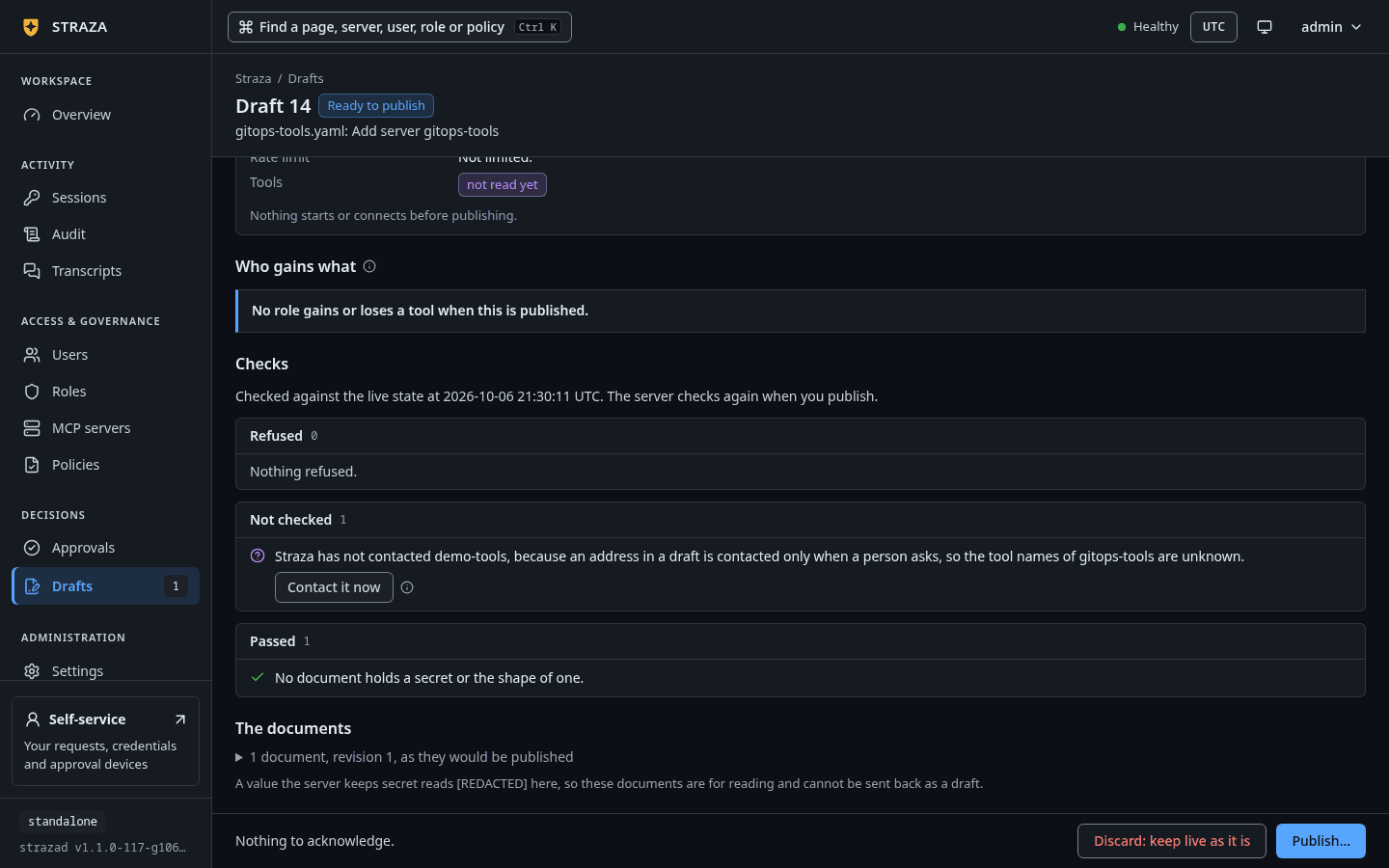
strazad, it came in through the apps directory, and its title starts with the file’s name, as ingitops-tools.yaml: Add server gitops-tools. Straza has checked it against live state, and nothing is installed yet. This step belongs to a person who may publish.- Drafts
- Waiting
- gitops-tools.yaml: Add server gitops-tools
- Publish…
- Publish
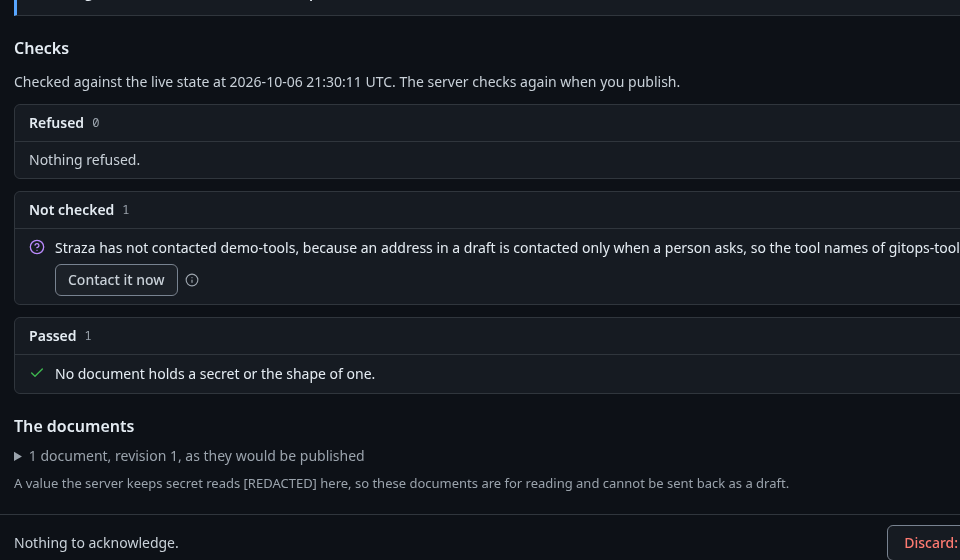
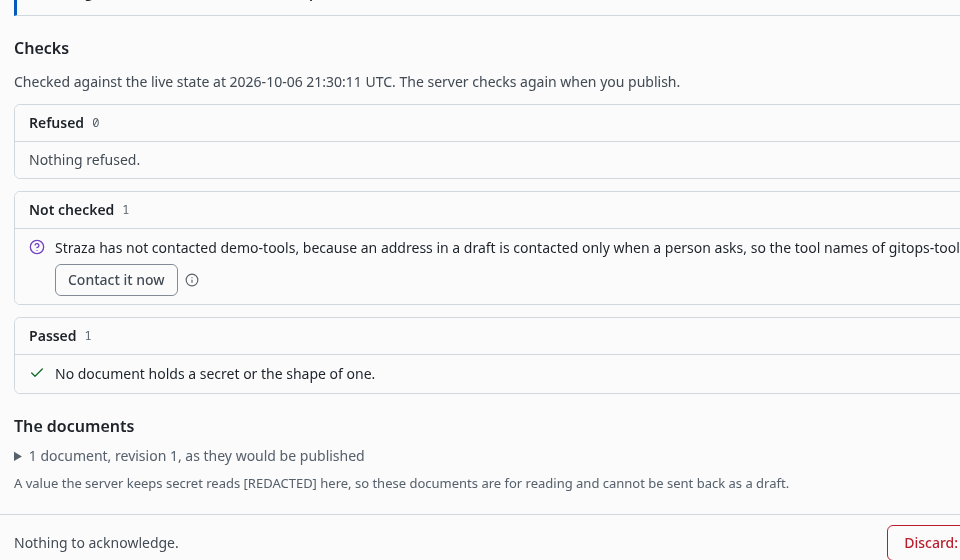
The draft’s Checks, where the server’s address is not contacted yet and Contact it now reads its tools. Show the whole screen The draft’s page shows What changes, Who gains what and Checks. The publish dialog lists each line that widens access, and you acknowledge each one before Publish works.
strazactl drafts listshows it with the PROPOSERstrazadand the DOORapps directory. Read it, then publish it with the id the list printed:strazactl drafts list strazactl drafts show <id> strazactl drafts publish <id>Publishing asks you to acknowledge each line of the check that widens access.
Straza does not dial an address that only a draft names. Until a person asks, the check lists among what it could not check
Straza has not contacted mcp.example.com, because an address in a draft is contacted only when a person asks, so the tool names of gitops-tools are unknown.To read the tool names before you publish, press Contact it now on the draft’s page, or runstrazactl drafts contact <id> gitops-tools. Only a person contacts it, so an admin API token is refused. strazad dials the address once, with no credential, follows no redirect, starts nothing, and keeps the tool names on the draft for its check. The audit chain records who asked. Propose and publish a change walks the whole life of a draft.Publishing installs the server on every replica and writes
apps.installwith you as its actor.strazactl apps listshowsgitopsin the SOURCE column of a server whose last change was published from a file. The new server gives nobody access, so give a role access to it next, as Access per role shows.Change a manifest
Editing the file proposes a draft for the new revision. The earlier draft of the same file is discarded with the reason “a newer revision of the file replaced it”, unless a person revised that draft, in which case it stays open. A file whose manifest equals the live server proposes nothing. When a file goes back to a revision someone published or discarded, Straza does not propose it again.
A file that does not parse, names an OAuth provider strazad does not know, holds a secret or holds a masked value becomes a draft with no items, titled with the file’s name and
Does not read. Its check refuses it withfile.refused, whose sentence names the file and says why, and whose fix ends withStraza proposes it again once it is saved. Such a draft never publishes, and it keeps none of the file’s bytes, so a secret pasted into a file never lands in a draft.Remove a manifest
Deleting the file proposes a draft that removes the server a publish from that file installed. Its check lists what goes with the server: its access rows, every stored credential with the per-user sign-ins, and the server’s admin role and every role the server owned, with their memberships. Publishing it asks you to type the server’s name, then removes them all and writes the same records a removal from the console writes, with you as their actor.
On a host install, delete the file from the directory. In a container, delete it from another container that mounts the same volume, because the image has no shell:
docker run --rm --volumes-from straza-eval-strazad-1 alpine rm /var/lib/straza/apps/gitops-tools.yaml- Drafts
- Waiting
- gitops-tools.yaml: Remove server gitops-tools
- Publish…
- Publish
Type
gitops-toolswhere the dialog asks, then press Publish.strazactl drafts list strazactl drafts publish <id>Discarding that draft keeps the server as it is and ends its link to the file, so Straza does not propose the removal again. In the console that is Discard: keep gitops-tools, an optional reason and Discard draft, and in a terminal
strazactl drafts discard <id>. From then on the server is changed like any server the console or the API installed.A file deleted while strazad was down is proposed for removal at the next start. When another file of the directory cannot be read or does not parse at that start, strazad logs the files to fix and proposes nothing, because that file may still name the server. Moving a file to another name, or a second file that names the same server, proposes no removal while any file still names the server. Changing
metadata.namein a file proposes one draft that adds the new server and removes the old one.
The directory and the other ways in
A file owns nothing. strazactl apps install -f, the admin API and the console change and remove a server that a file names like any other server, and each change is its own publish. The admin API’s list of servers names the file in file, and file_differs is true while that file’s manifest differs from the live server, for example after a change on the console. In the console, the server’s page then says Live differs from the file.
To bring the file back in line with live, start from strazactl apps export <server>, which prints the live manifest. The export prints [REDACTED] in place of every environment value, every value and default in the server block and every value the secret scan reads as a secret, and it hides the user part, the query, the fragment and a generated path part of every address. The apps directory takes no mask, and a file that still holds one is refused, so write each masked value back into the file before you commit it, or move one secret into a stored credential. A second secret, or one a server takes only as an argument, stays in the file.
A server paused with strazactl apps disable takes a file’s change like any other. Publishing the draft stores the new manifest and the server stays stopped until strazactl apps enable starts it with that manifest.
Verify
Every draft the directory proposes is one log line, apps directory: proposed a draft, which a person publishes or discards, with the draft, its title and the file. The audit chain holds a draft.create for each, with the file and its sha256 and no actor, and every publish and discard has its own record. To undo a server the directory installed, delete the file and publish the removal it proposes. Discarding a draft the directory proposed changes nothing live.
Next
Show MCP Apps views lets a chat app render a server’s views through Straza.
Walked on v1.1.0 on 2026-09-28. Linux container, standalone profile, for where the directory lives and the log line that names it. The steps that propose, publish and remove a server through a draft, and the refused file, ran on the enterprise demo stack with the file copied into its strazad container and a server name of its own in place of gitops-tools. Console screenshots show strazad v1.1.0-117-g106081a8, standalone.