Push delivery and connectivity
Every enrolled phone can reach the approver listener, push wakes it for each request, and you have checked both from the server.
- Who
- You, as the admin who runs strazad
- Where
- The strazad configuration, the console and a shell on the phone's network
- Profile
- Standalone and enterprise
On this page
You, as the admin who runs strazad, give every enrolled phone a server address it can reach, and choose how Straza wakes the phone for each request. The setup lives in the strazad configuration, and the checks run from the console. By the end of this page the approver listener has an address the phone can open, push reaches the phones, and you have checked both from the server side.
The phone connects to Straza over HTTPS. It fetches pending requests and sends signed decisions directly to the server. Push is the wake-up. When a rule holds a call, Straza sends the request to the approver’s phone as a push notification, and the app opens on it.
The push carries a version, a reference and a kind, and nothing else, so the push service never sees the command, its arguments or a username. The phone fetches the request from the server it enrolled with, so a forged push cannot redirect a decision. If that connection cannot be made before the request expires, the call is denied.
Push is never the only path. The Straza approver app polls the pending queue every 15 seconds while it is open, and the self-service page in a browser polls every 5 seconds. That poll is the floor. A deployment with no push lane, even an air-gapped server with no outbound route, still gets its decisions, with that much delay and only while the app is in front of the person. Set the rule’s timeoutSeconds with the poll floor in mind.
Before you start
- Write access to the strazad configuration.
- A way for the phone to reach one address: the same Wi-Fi, a VPN profile on the phone, or a tunnel hostname.
Enrolling the phone comes after this page, in Approve on a phone.
Check the approver listener
strazad serves the phone on a dedicated HTTPS listener that answers only the approver routes, on port 8443 by default. Standalone mints a certificate at first boot and keeps the key pair under the data directory. In enterprise, turn on auto-mint or supply a certificate yourself. Standalone and enterprise compared shows both defaults.
The enrollment QR supplies the public-key pin, so a self-signed certificate works. Its hostname must still match the advertised host, and the certificate must stay valid. An auto-minted pair lasts 820 days. Replacing it changes the pin, and every phone must enroll again.
CLI onlyThe console shows the listener’s address and pin only when it mints an enroll token, so read them from the version endpoint.
curl -s http://localhost:8420/version{"version":"v1.1.0-104-g07d2df0e","commit":"07d2df0e1c3ef4c0057d2dd204b41b9180aefc75","go":"go1.26.8","os":"linux","arch":"amd64","profile":"enterprise","runtimes":["remote"],"approver":{"public_url":"https://127.0.0.1:8443","tls_spki_pin":"sha256/FWLhewF1uqb8mj2+J0OTVM2TuIE8vNQdt5lYjwWmpy4=","cert_not_after":"2028-12-29T16:18:42Z","auto_minted":true,"cert_file":"/var/lib/straza/approver-tls/cert.pem"}}You should see
The
approverblock names thepublic_urla phone dials, itstls_spki_pinand the certificate’scert_not_after.The settings live under
server.approverTLS. The small line under each setting is its environment variable.Setting What it sets server.approverTLS.listenSTRAZA_APPROVER_TLS_LISTENThe address of the listener. Auto-mint fills in :8443.server.approverTLS.certFileSTRAZA_APPROVER_TLS_CERT_FILEThe PEM certificate a phone pins at enrollment. server.approverTLS.keyFileSTRAZA_APPROVER_TLS_KEY_FILEThe private key of that certificate. server.approverTLS.publicUrlSTRAZA_APPROVER_TLS_PUBLIC_URLThe https URL a phone dials, written into the QR as it stands. server.approverTLS.autoMintSTRAZA_APPROVER_TLS_AUTO_MINTLets strazad fill in the keys you leave unset at boot. If this fails
Set server.approverTLS.listen to a free port, or server.approverTLS.autoMint: false to run without the dedicated approver surface- Another process holds the port, so boot is refused. Give the listener another
listen, or turn the dedicated listener off. approver TLS state is half-present:- One half of the key pair is missing, and strazad refuses to mint a second pair behind the phones’ backs. Restore the missing file from backup. Deleting both files mints a new pair at the next boot, which changes the pin, so every phone must enroll again.
Make the address reachable from the phone
The QR names one address, and the phone must be able to open it from wherever the approver stands. You choose it once, when you set
server.approverTLS.publicUrl. It takes one of three shapes:- On a home or office network, the server’s LAN address works while the phone is on the same Wi-Fi.
- Away from it, a WireGuard or Tailscale profile on the phone makes the same private address reachable. A request raised while the profile is off waits and then expires.
- For a server reached through a tunnel or a reverse proxy on a public hostname, set that hostname.
A proxy or ingress may terminate TLS for the approver surface on its own public hostname, with a public certificate. Then set
server.approverPublicUrlto that hostname, and leave the dedicated listener off withserver.approverTLS.autoMint: falseand noserver.approverTLS.publicUrl. Aserver.approverTLS.publicUrl, which auto-mint fills in on its own, wins overserver.approverPublicUrl.The QR then carries no pin, and the phone trusts the system store. The enroll output says
TLS SPKI pin: none (public-CA TLS via the system trust store, the expected ingress shape). Mixing the two, a public hostname with a pin that belongs to the listener behind the proxy, is refused by design. The phone would pin a key that the host it dials never presents.These four situations cover most deployments.
Situation The push The decision Server on a home network, phone on the same Wi-Fi Arrives through the push service Travels directly to the server Phone away, with its VPN profile on Arrives over the VPN Travels over the VPN Phone away, with its VPN profile off Still arrives Cannot travel, so the request waits and is denied at timeout Fully air-gapped server Nothing is pushed The app decides by polling while it is on the network Choose how push reaches the phone
Each push lane is a different route from your server to a phone.
Lane Phones it reaches What the deployment holds Vendor account Hosted relay the Straza approver app on iOS and Android an anonymous token strazad mints none WebPush the self-service page in a browser, an iOS home-screen app, and an ntfy app registered with keys a VAPID key strazad mints none Plain ntfy the ntfy app on Android, or any UnifiedPush app an allowlist of push hosts none Your own Firebase Android phones, direct a service account file plus four public ids Google Your own APNs iOS phones, direct a .p8 key plus a key id, a team id and a topic Apple The relay covers both platforms at once, and it is the only way to reach an iOS phone without an Apple key of your own. Turning it on beside a direct Firebase or APNs sender refuses boot, so a preference between two senders for one platform is never silent.
Each lane below has a table of its settings. The small line under each setting is its environment variable.
The hosted relay
The relay needs nothing created on your side. With the relay on, strazad registers with it once, anonymously, and every push for a native phone travels through it. The quickstart compose template and the Helm chart ship the relay on, in plain sight, and each says where its off switch is.
approval:
  push:
    relay:
      enabled: true
      tokenFile: /var/lib/straza/push-relay-token
Setting What it sets approval.push.relay.enabledSTRAZA_APPROVAL_PUSH_RELAY_ENABLEDTurns the lane on. falseturns it off at the next boot, and the token file may stay for the next time.approval.push.relay.tokenFileSTRAZA_APPROVAL_PUSH_RELAY_TOKEN_FILEWhere the anonymous token lives. Required when the relay is on. approval.push.relay.urlSTRAZA_APPROVAL_PUSH_RELAY_URLThe relay. Empty means the Straza-operated one at https://push.straza.ai.strazad mints the token at the first boot that finds no file there and writes it with mode 0600. If the relay ever refuses the token, strazad mints a fresh one once. The relay keeps only a hash of the token and knows nobody by it.
What leaves your deployment is the envelope, a version, a reference and a kind, plus the push route the phone registered and a delivery deadline. The relay refuses any other field with a 400, so a command, an argument or a name cannot enter it even by mistake. It holds Straza’s Apple key and Firebase service account and forwards to the phone. The verdict of that send comes back as a 200 with a delivered flag, so a platform refusal is never mistaken for a relay problem.
The relay allows five registrations per hour from one address and 120 sends per minute per token. A restart that keeps the token file registers nothing new. A pod whose data directory is an emptyDir mints a token on every start, which the chart’s values file says beside its switch.
When several replicas share the data directory
When two replicas start at the same moment, the first to create the token file keeps its token. The other uses the token in the file and logs that another replica registered first. After a refusal, a replica first looks for a newer token in the file, which another replica may have written, and registers only when the file still holds the refused one.
If this fails
approval.push.relay: tokenFile is required when the relay is enabled- Set
approval.push.relay.tokenFileto a path under the data directory. approval.push.relay and approval.push.fcm are both enabled for the same lane- Keep one sender for Android. The relay needs no Firebase project, and your own Firebase sends direct with no relay.
approval.push.relay and approval.push.apns are both configured for the same lane- Keep one sender for iOS, the relay or your own .p8 key.
WebPush
Setting What it sets approval.push.webpush.vapidKeyFileSTRAZA_APPROVAL_PUSH_WEBPUSH_VAPID_KEY_FILEThe whole switch of the lane. Point it at a path under the data directory. approval.push.webpush.contactSTRAZA_APPROVAL_PUSH_WEBPUSH_CONTACTOptional. A mailto:orhttps:address a push service may use to reach you. Refused when it is set without the key file.At the first boot that finds no file at the key path, strazad mints a P-256 key, writes it with mode 0600 and logs
webpush VAPID key minted. When two replicas share the data directory and start at the same moment, one mints the key, and the other loads it whole and logswebpush VAPID key loaded. The public half rides every enroll QR. The self-service page in a browser, an iOS home-screen app and an ntfy app registered with keys all subscribe against it.Back up the VAPID key
The key is the deployment’s push identity. Replacing it strands every subscription made against the old one, and none of them registers again on its own. Back the file up with the sealing key and the approver TLS pair, and never rotate it casually. Keys, certificates and tokens lists it with the rest.
UnifiedPush and ntfy
An ntfy app subscribes to a topic on a server, and the phone registers that endpoint with strazad.
approval.push.allowedPushHosts,STRAZA_APPROVAL_PUSH_ALLOWED_HOSTSin the environment, lists the hosts such an endpoint may point at, UnifiedPush or WebPush. strazad checks the list twice. It checks when the phone registers, so a refused endpoint is never stored, and again at every send, so a host removed from the list stops receiving.An entry matches the host exactly.
*.notify.windows.commatches every host under that suffix, which is how the browser push services that mint per-tenant hostnames get in.The list is where your deployment’s outbound push traffic may go, so nothing goes anywhere until you say where. A WebPush subscription needs the same list entry for its push service. That is why the templates name
ntfy.shand the four browser push hosts together.If this fails
host "ntfy.example.com" refused. approval.push.allowedPushHosts is empty, and no push host is allowed until it names the push services this deployment may contact- The list is empty, and the phone shows this 400 word for word. Add the push services this deployment may contact to
approval.push.allowedPushHosts. host "ntfy.example.com" is not in approval.push.allowedPushHosts- The list does not name this push service. Add its host, if this deployment may contact it.
The list also binds where a send is redirected. strazad’s push clients follow a redirect only within the scheme, host and port they sent to, and only as a 307 or 308. A push service therefore cannot pass the payload or a token to a host outside the list. Any other redirect, a loop of 10 redirects, or a Location that is not a valid address fails the send. The failure names the address and the redirect, and the channel’s last delivery shows it.
Your own Firebase
With your own Firebase project, strazad sends to Android phones itself.
Setting What it sets approval.push.fcm.enabledSTRAZA_APPROVAL_PUSH_FCM_ENABLEDTurns on the direct sender. approval.push.fcm.serviceAccountFileSTRAZA_APPROVAL_PUSH_FCM_SERVICE_ACCOUNT_FILEThe credential that signs every send. approval.push.fcm.projectIdSTRAZA_APPROVAL_PUSH_FCM_PROJECT_IDThe project id, a public identifier. approval.push.fcm.appIdSTRAZA_APPROVAL_PUSH_FCM_APP_IDThe Android app id, a public identifier. approval.push.fcm.apiKeySTRAZA_APPROVAL_PUSH_FCM_API_KEYThe API key, a public identifier. approval.push.fcm.senderIdSTRAZA_APPROVAL_PUSH_FCM_SENDER_IDThe sender id, a public identifier. The service account file is the credential. It signs every send and stays on the server, and a copy of it sends pushes for your app. The four public identifiers reach the phone at enrollment, so the app can initialize Firebase for your project without a config file baked into it. They are all-or-nothing, and a partial set refuses boot naming the missing ones.
The Firebase console locations below were not checked against a Firebase project for this page.
Value Where the Firebase console shows it The project id Project settings, the General tab The app id The App ID of the Android app registered on the General tab, which google-services.jsoncallsmobilesdk_app_idThe API key current_keyin the same fileThe sender id The project number, on the Cloud Messaging tab The service account file The Service accounts tab, where Generate new private key downloads it once Your own APNs
With your own Apple key, strazad sends to iOS phones itself. Apple issues the .p8 key under Keys in the developer portal, lets you download it once, and shows its key id beside it. Unlike the other key files, strazad never mints it.
Setting What it sets approval.push.apns.keyFileSTRAZA_APPROVAL_PUSH_APNS_KEY_FILEThe switch: the path of the .p8 key. approval.push.apns.keyIdSTRAZA_APPROVAL_PUSH_APNS_KEY_IDThe key id the portal shows beside the key. approval.push.apns.teamIdSTRAZA_APPROVAL_PUSH_APNS_TEAM_IDYour team id, from the portal’s Membership page. approval.push.apns.topicSTRAZA_APPROVAL_PUSH_APNS_TOPICThe bundle id of the Straza approver app build you sign. approval.push.apns.environmentSTRAZA_APPROVAL_PUSH_APNS_ENVIRONMENTHow that build was signed: production, the default, orsandbox.Boot refuses the key file without the key id, the team id and the topic, and names the missing ones. Use
productionfor every TestFlight and App Store build, andsandboxonly for a build signed with a development profile. A token from one environment sent to the other fails asBadDeviceToken.The key is a credential and never an identity. A leaked or lost key is revoked in the portal and replaced, and no phone enrolls again.
Check the path from the server
- Approvals
- Channels
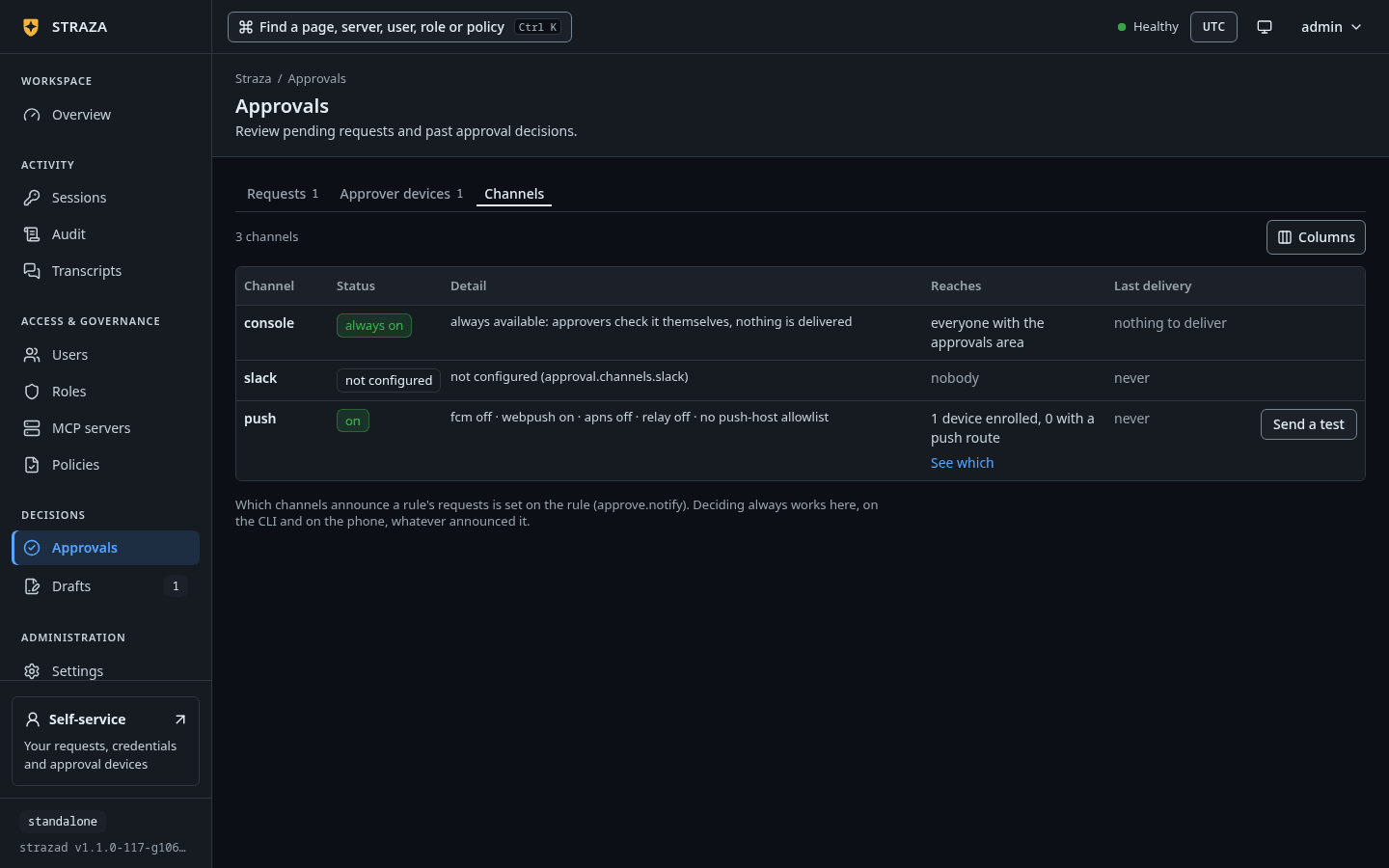
The Channels tab gives push one row. Its
Detailcell carries the server’s own sentence naming the lanes and the allowed hosts. ItsReachescell counts the enrolled devices against the ones that registered a push route, with aSee whichlink into the Approver devices tab.CHANNEL STATUS DETAIL REACHES LAST DELIVERY push on fcm off · webpush on · apns off · relay on · allowed hosts: *.notify.windows.com, fcm.googleapis.com, ntfy.sh, updates.push.services.mozilla.com, web.push.apple.com 0 devices enrolled, 0 with a push route neverThe row is the push channel as the demo stack’s channel route answered it, in the console’s words. A gap between the two numbers in
Reachesmeans a phone that decides only while its app is open. Here no device is enrolled yet.A configured lane’s row carries Send a test. It pushes a content-free line through the real delivery path and reports each registered route’s outcome. A phone that shows nothing is then a route problem and never a policy one.
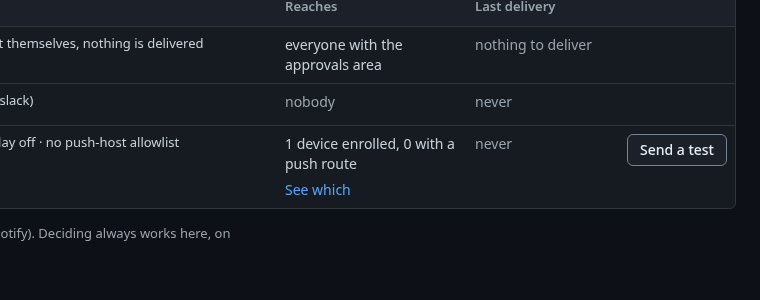
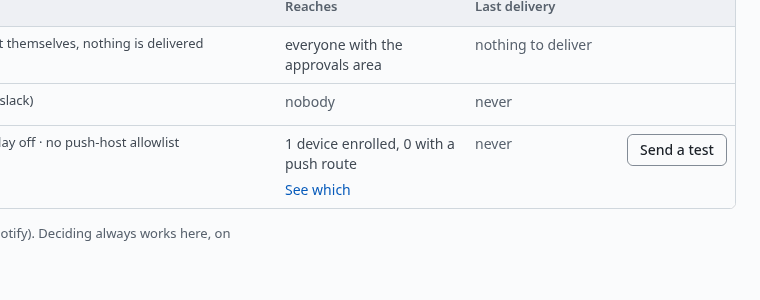
The push row of the Channels tab, with Send a test at its end. Show the whole screen strazactl has no command for the channels. With an admin token,
GET /v1/admin/approvals/channelsreturns the same row the console shows, andPOST /v1/admin/approvals/channels/push/testsends the same content-free test.The strazad log is the positive control at boot. With the relay on, it prints
push relay client readywith the relay URL and the token file. The WebPush lane printswebpush VAPID key mintedat its first boot andwebpush VAPID key loadedafter that. On the demo stack, whose token file is/var/lib/straza/relay-token, the two lines read as follows, with the time field trimmed.{"level":"INFO","msg":"webpush VAPID key loaded","file":"/var/lib/straza/webpush-vapid.pem"} {"level":"INFO","msg":"push relay client ready","url":"https://push.straza.ai","tokenFile":"/var/lib/straza/relay-token"}From a shell on the phone’s network, the listener answers
/readyzand nothing else without a device credential. On the demo stack a request to/v1/approver/pendingwithout one is refused with 401, and a request for the root path is answered 404. Both are the expected shape and prove that the address and the port are reachable.
Undo
server.approverTLS.autoMint: false with no listen removes the dedicated listener at the next boot. Enrolled phones then cannot decide until you enroll them again against another address. To turn the relay off again, set approval.push.relay.enabled: false, as The hosted relay shows.
Walked on v1.1.0-117-g106081a8 on 2026-10-06. Read only against the demo stack on this box, which runs v1.1.0-104-g07d2df0e under the enterprise profile, where the version endpoint, the push lines of the strazad log, the channel status route with an admin session and the approver listener's three answers were read live. The two boot refusals of the listener and the ingress shape's enroll output were run on a throwaway standalone server at v1.1.0-117-g106081a8. No phone, tunnel, relay send, direct Firebase or APNs lane was run, and the console's Channels tab was read at source. Console screenshots show strazad v1.1.0-117-g106081a8, standalone.