Tickets
The command terraform apply needs a ticket, an approver grants it once, and a later session runs it once.
- Who
- You as the admin, and lena as the approver
- Where
- The console or a terminal with strazactl, and the agent's machine for the calls
- Profile
- Standalone and enterprise
On this page
A ticket is an approval that outlives the moment it was asked for. The agent’s call raises a request that a person has a day to decide, and an approval leaves behind a grant the agent consumes with one later matching call, from the same session or a fresh one. Nothing waits while the person thinks, and the grant is single-use, so a second run asks again. A denied ticket keeps the call denied until its window closes, so a denial cannot be retried away.
Before you start
- The approver role
release-approversfrom Hold a call for a person, held by lena. - The
local-toolsallow rule from Your first deny, live for your role, and a machine enrolled as dana. - For a decision from a terminal, a
strazactllogin of the approver’s own, on their own machine or under their own operating system account, becausestrazactlkeeps one login per home directory.
Write the rule
- Policies
- New policy
- Needs approval
- Next
- A role
- local-tools
- Next
- Shell command
- Under Command patterns, type
terraform apply*and press Add, then Next. - Under Who decides, pick An approver role and
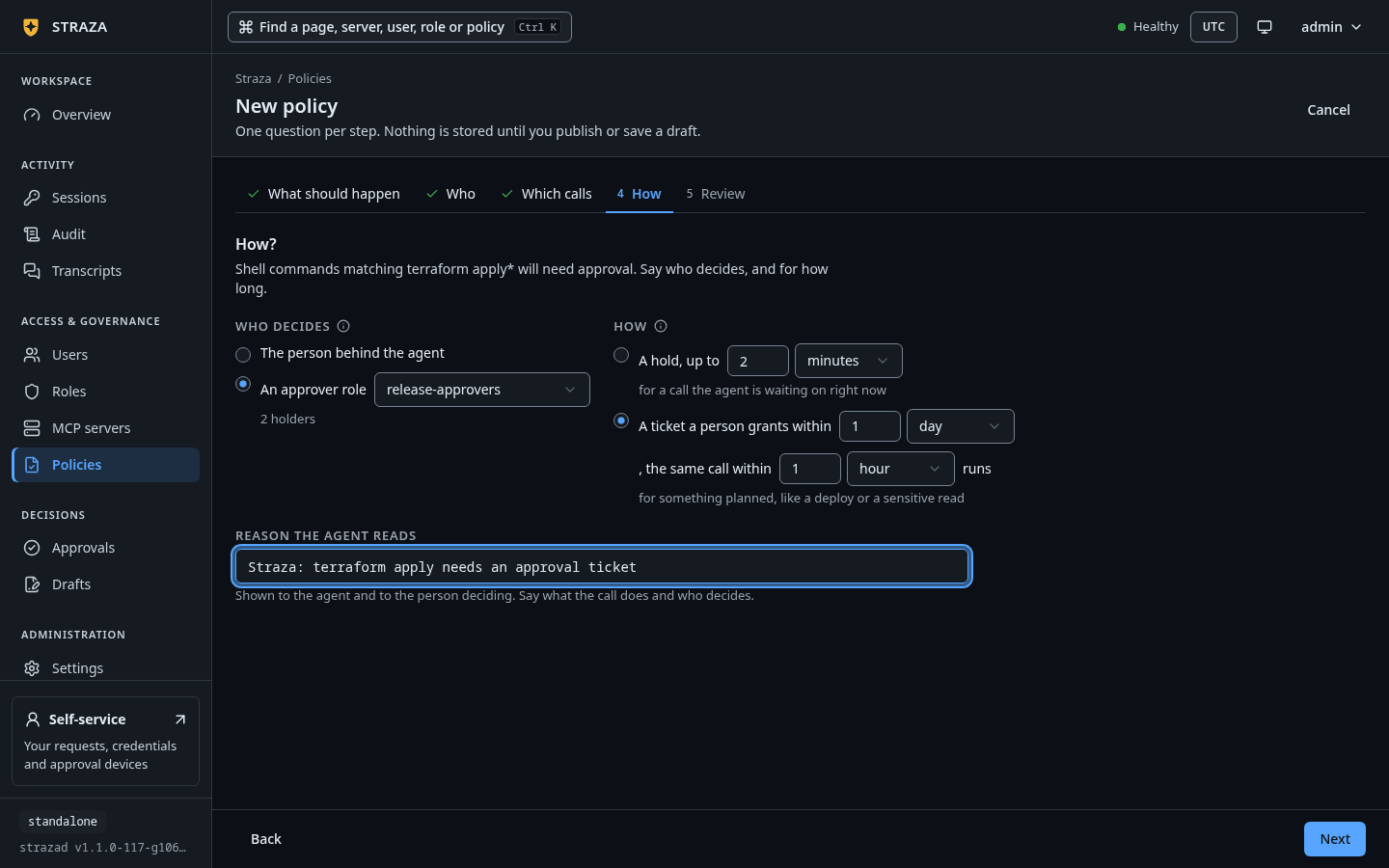
release-approvers. Under How, pick A ticket a person grants within. The windows start at 1 day for the decision and 1 hour for the run. Type the reason, then press Next. - On Review, name the set
deploy-ticketand press Save and publish, then Publish.
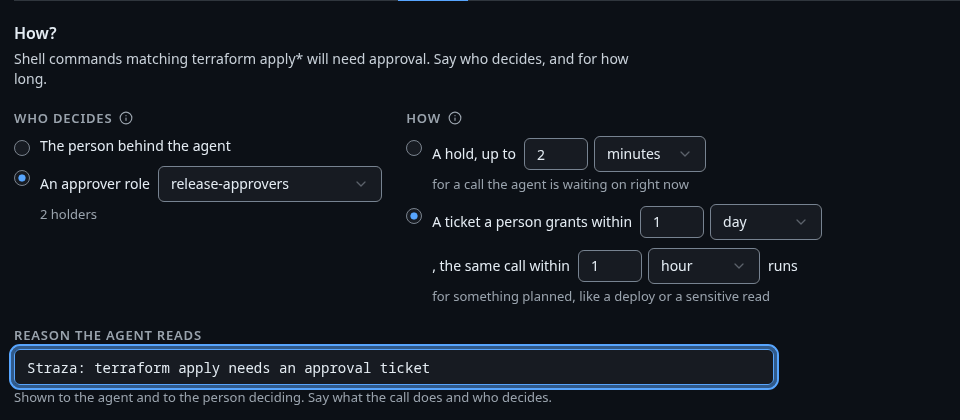
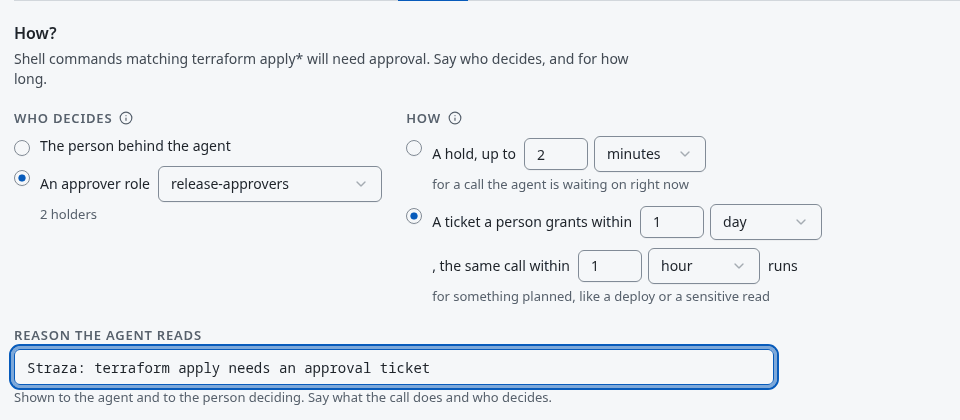
The How step with A ticket a person grants within picked, 1 day to decide and 1 hour to run. Show the whole screen Save this as
deploy-ticket.yaml:apiVersion: straza.dev/v1beta1 kind: PolicySet metadata: name: deploy-ticket description: Gate terraform apply behind a day-scale ticket a release-approvers holder grants once spec: priority: 10 match: roles: [local-tools] rules: - id: ticket-terraform-apply events: [tool.pre] tools: [shell.exec] command: allowPatterns: ["terraform apply*"] effect: allow mode: approve approve: class: ticket roles: [release-approvers] ticketTTLSeconds: 86400 grantTTLSeconds: 3600 reason: "Straza: terraform apply needs an approval ticket"strazactl policy apply -f deploy-ticket.yaml strazactl policy activate deploy-ticketapplied deploy-ticket (Off, 01a1130c-776e-7655-b074-46dca59f8915) published deploy-ticket, it is live now; new snapshot 79e36f8967f7a06b60cf226f46f69bfd77367babad85ef8cadc6c786d9aee19eclass: ticketreplaces the blocking wait with two clocks.ticketTTLSecondsis the decision window, 24 hours by default and at most 30 days.grantTTLSecondsis how long an approved grant stays consumable after the decision, one hour by default and at most 24 hours. Lifetimes and timeouts lists both beside the other approval windows. The hold knobstimeoutSecondsandretryTTLSecondsare rejected under this class, because a ticket never blocks. The grant binds the exact call by its fingerprint, so an argument that changes after approval, even a nonce or a timestamp, makes a new request.Raise the ticket
CLI onlyThe call comes from dana’s enrolled machine.
In a new session, run the gated command. The hook answers at once with a deny that names the ticket, the decision window and where a person decides. The agent is told to retry this exact call after approval.
printf %s '{"hook_event_name":"SessionStart","session_id":"d4a2c9e1-3b7f-4e58-a6c0-2f8b1d3e5a04","cwd":"/home/dana/work","source":"startup"}' | straza hook --harness claude-code >/dev/null
printf %s '{"hook_event_name":"PreToolUse","session_id":"d4a2c9e1-3b7f-4e58-a6c0-2f8b1d3e5a04","cwd":"/home/dana/work","tool_name":"Bash","tool_input":{"command":"terraform apply -auto-approve"}}' | straza hook --harness claude-code; echo "exit $?"
{"hookSpecificOutput":{"hookEventName":"PreToolUse","permissionDecision":"deny","permissionDecisionReason":"Straza: approval ticket 01a1130c-7854-7176-a31c-5b737b0361fa is pending. A person decides within 24 hours, on the self-service page (http://127.0.0.1:8420/self-service/), the console, or an enrolled phone. Retry this exact call after approval; it fails if denied or expired."}} Straza: approval ticket 01a1130c-7854-7176-a31c-5b737b0361fa is pending. A person decides within 24 hours, on the self-service page (http://127.0.0.1:8420/self-service/), the console, or an enrolled phone. Retry this exact call after approval; it fails if denied or expired. exit 2Find the ticket
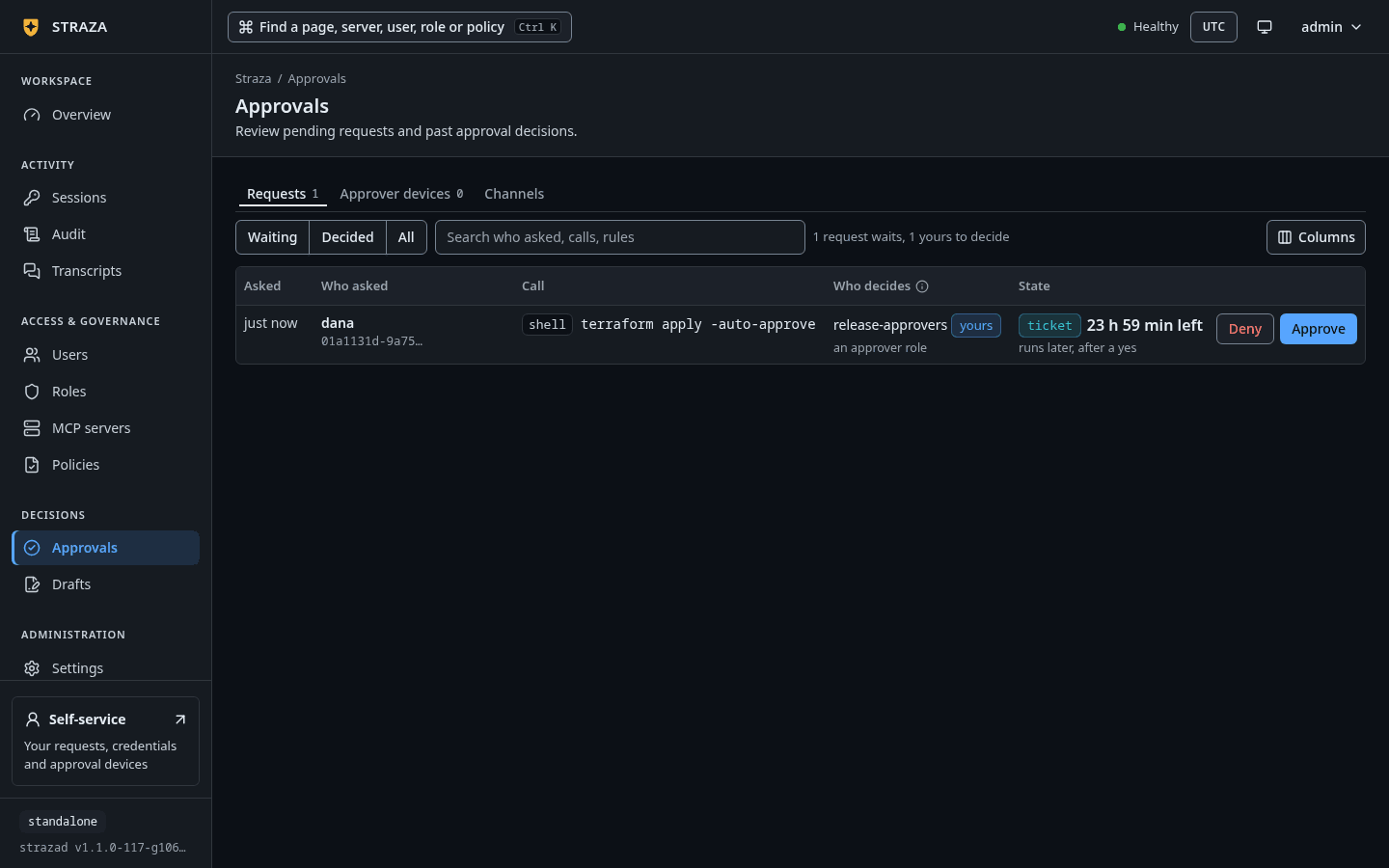
A ticket is a pending approval like any other, with no tab of its own.
- Approvals
- Requests
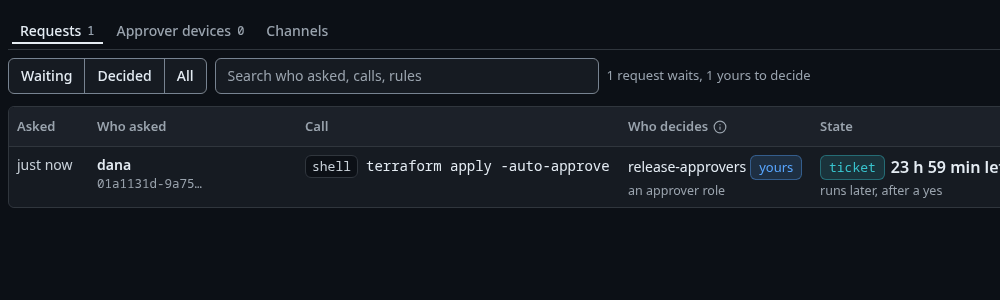
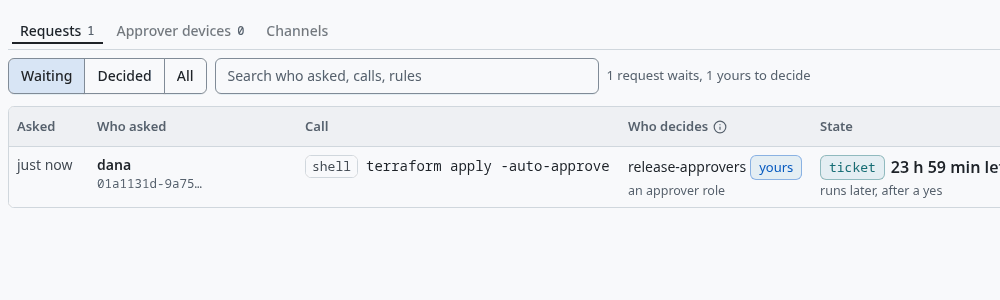
dana’s terraform applywaiting as a ticket, withruns later, after a yesunder the chip. Show the whole screenThe ticket is one row of the queue. Its State cell follows the ticket:
Waitingfirst, withticketon the line beneath where a hold showshold, thenApprovedwhile the grant window is open,Usedonce a call has cashed it,Deniedwhen the approver said no, andExpiredwhen nobody decided in the window or the grant closed unused.strazactl approvals listID STATE REQUESTER SUMMARY ROLES EXPIRES DECIDED BY 01a1130c-7854-7176-a31c-5b737b0361fa pending dana shell.exec: terraform apply -auto-approve release-approvers in 23h59m59sWhen the approver has a phone enrolled, Straza sends the request to the phone when the ticket is raised and once more two hours before it lapses undecided (
approval.push.ticketReminderBefore).Approve it
This step is lena’s. The reason is optional, at most 500 bytes of plain text, and it is recorded on the request and in the audit log as the answer to why this was allowed.
- Approvals
- Requests
- terraform apply -auto-approve
- Approve
- Approve request
Type the reason under
Reason, optionalbefore Approve request.strazactl approvals approve 01a1130c-7854-7176-a31c-5b737b0361fa --reason "Change window CR-2041 is open until 18:00"You should see
approved 01a1130c-7854-7176-a31c-5b737b0361fa (by lena)Consume the grant
CLI onlyThe call comes from dana’s enrolled machine.
The grant follows the person and the exact call, so a fresh session can cash it. An approved grant must be consumed inside its grant window. Start a new session and run the same command. It is allowed, and the audit record says which ticket was consumed.
printf %s '{"hook_event_name":"SessionStart","session_id":"e5b3d0f2-4c80-4f69-b7d1-3a9c2e4f6b05","cwd":"/home/dana/work","source":"startup"}' | straza hook --harness claude-code >/dev/null
printf %s '{"hook_event_name":"PreToolUse","session_id":"e5b3d0f2-4c80-4f69-b7d1-3a9c2e4f6b05","cwd":"/home/dana/work","tool_name":"Bash","tool_input":{"command":"terraform apply -auto-approve"}}' | straza hook --harness claude-code; echo "exit $?"
{"hookSpecificOutput":{"hookEventName":"PreToolUse","permissionDecision":"allow"}} exit 0Run it a second time and a new ticket opens, because the grant was single-use. One approval buys one run. The hook’s reason, trimmed to its line:
Straza: approval ticket 01a1130c-95b0-7716-8150-a521bffdfa95 is pending. A person decides within 24 hours, on the self-service page (http://127.0.0.1:8420/self-service/), the console, or an enrolled phone. Retry this exact call after approval; it fails if denied or expired.Deny the second ticket
Next, the approver denies the second ticket. The next identical call is denied with a reason that names the decider and how long the call stays denied, and no new ticket opens until that window closes.
- Approvals
- Requests
- terraform apply -auto-approve
- Deny
- Deny request
strazactl approvals deny 01a1130c-95b0-7716-8150-a521bffdfa95 --reason "No second apply in this window"You should see
denied 01a1130c-95b0-7716-8150-a521bffdfa95 (by lena)After the denial, the hook answers the same
terraform apply -auto-approvecall with:Straza: ticket 01a1130c-95b0-7716-8150-a521bffdfa95 was denied by lena; this call stays denied until 2026-10-07T21:09:14ZRead the audit log
A ticket writes a request phase, a resolution phase and, once cashed, a consumed phase that names the consuming session. The decider’s words ride the resolution. A decision made with
strazactlis recorded under the channelconsole.- Audit
- Lens
- approvals
strazactl audit tail --limit 40#24 [dana] {"data":{"approvalId":"01a1130c-7854-7176-a31c-5b737b0361fa","channel":"console","decidedReason":"Change window CR-2041 is open until 18:00","lane":"hook","phase":"resolution","rule":"ticket-terraform-apply","set":"deploy-ticket","state":"approved"},"type":"straza.audit.approval"} #25 [dana] {"data":{"approvalId":"01a1130c-7854-7176-a31c-5b737b0361fa","consumedAt":"2026-10-06T21:09:14Z","consumedBy":"01a1130c-9566-7901-a0de-cdc54e2aa5a7","phase":"consumed","rule":"ticket-terraform-apply","set":"deploy-ticket","state":"approved"},"type":"straza.audit.approval"} #29 [dana] {"data":{"approvalId":"01a1130c-95b0-7716-8150-a521bffdfa95","channel":"console","decidedReason":"No second apply in this window","phase":"resolution","rule":"ticket-terraform-apply","set":"deploy-ticket","state":"denied"},"type":"straza.audit.approval"}The listing is trimmed to these three records and to the fields that matter here.
Undo
Turn the set off under Policies with More and Turn off, or with strazactl policy deactivate deploy-ticket. Open tickets keep their state: a pending one still expires on its own clock, and an approved grant that nobody consumes lapses at the end of its grant window.
Walked on v1.1.0-117-g106081a8 on 2026-10-06. A throwaway standalone server in a Linux container, with the admin steps on an admin API token, the hook events fed to straza hook by hand on a machine enrolled as dana, and lena deciding with strazactl from her own login. The console form was not walked in a browser, and its words were read at source. Console screenshots show strazad v1.1.0-117-g106081a8, standalone.