Delegated admin
Give a person admin rights over chosen areas of Straza, such as the audit chain or sessions, without the root role.
- Who
- You, as the root admin
- Where
- The server's config file, then the console or a terminal with strazactl
- Profile
- Standalone and enterprise
On this page
You give a person admin rights over one area of Straza, such as reading the audit chain or revoking sessions, as the root admin. You edit the server’s config file, then assign the role in the console or with strazactl. At the end the person administers that area and no other, and the root role straza-admin stays the one spelling of full power.
A map in the server configuration, admin.roleAreas, says which slice of the admin plane a role administers. Your identity manager decides who holds the role, the same way it decides every other membership.
To let people administer one MCP server and nothing else, give them that server’s admin role instead, as Delegate one MCP server describes. The two compose: a person may hold a mapped role and a server’s admin role at once, and the server unions everything they hold.
Pick the areas
A scope is an area and a verb, written
area:readorarea:write, and the verb follows the HTTP method of the request: a GET is a read and everything else is a write. The twelve areas are the same ones that admin API tokens use, so a scope list reads the same wherever you meet it. Every admin route belongs to exactly one area, and a route that no area covers is refused, never let through.Area What it covers identityusers, roles, assignments, devices, locks and knowledge packs sessionslisting sessions and revoking them, one or all, which is the kill switch transcriptsrecorded conversation content, kept apart from every other area on purpose auditthe decision and admin event history, content free policyPolicySets: read, write, validate, simulate and activate appsMCP servers, access rows, secrets, health and the tool catalog draftsdrafts of changes to MCP servers, roles, access rows and policy sets: drafts:readlists and reads them, anddrafts:writechecks, creates, changes, reverts, discards and publishes them, where a publish also needs a person with standing over every object in the draft, as Who may draft and publish explainsapprovalspending approval requests, approval channels and enrolled approver phones configposture reads, the overview, sinks and their replay, the attestation hash registry changesthe change feed a pull connector reads scimthe SCIM plane at /scim/v2, where an identity manager writes users and role membership;scim:readopens the reads and the discovery documents,scim:writethe writestokensadmin API tokens, included in no other scope Three scopes deserve a second look before you hand them out:
tokens:writemints admin credentials, and a holder can mint a token with full scope. It is equal to root, and the server logs a warning at boot for every role that receives it.sessions:writerevokes sessions, which stops agents mid-work.scim:writewrites role membership,straza-adminincluded, so it sits at the same tier asidentity:write.
The word
fullis not a scope you can write in this map. An entry forstraza-admin,straza-global-mcp-adminorstraza-draft-configrefuses to boot, because each would blur a meaning the product fixes.Map the role
The map goes in
straza.yamlon the server. It has no environment variable, because a map does not fit one, so on both profiles you edit the file. The enterprise demo stack ships this entry, which gives anyone holding the roleauditora read-only slice of the server:admin: roleAreas: auditor: [audit:read, sessions:read, transcripts:read]Restart strazad after the edit. The server validates every entry when it starts and refuses to run on a bad one, naming the role and the scope in the error, so a typo cannot leave a delegation silently inert. In the Helm chart the file is the
configYamlvalue, rendered into a ConfigMap, and a change to it rolls the pods for you.Give someone the role
The role itself is an ordinary role. You create it with
strazactl roles create <name> --kind straza, and your identity manager then sees it as a SCIM group and writes its membership, where each membership write is an assignment. The console does not make this kind of role, and its New role page saysStraza roles are not made here.The demo stack’s seeder createsauditoras a Straza role, the control plane kind, which opens the console and never any agent tool. Assign it to a person as the root admin.- Roles
- auditor
- Assign to a user
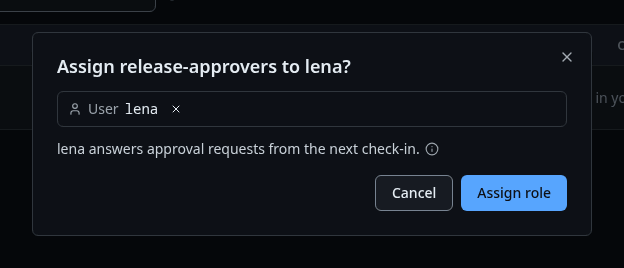
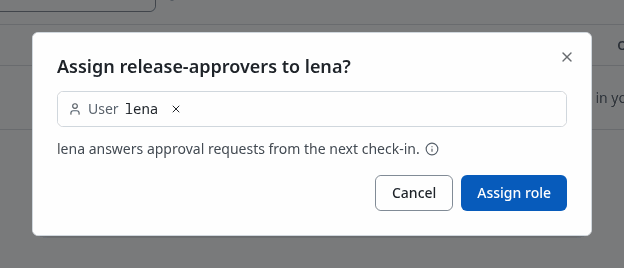
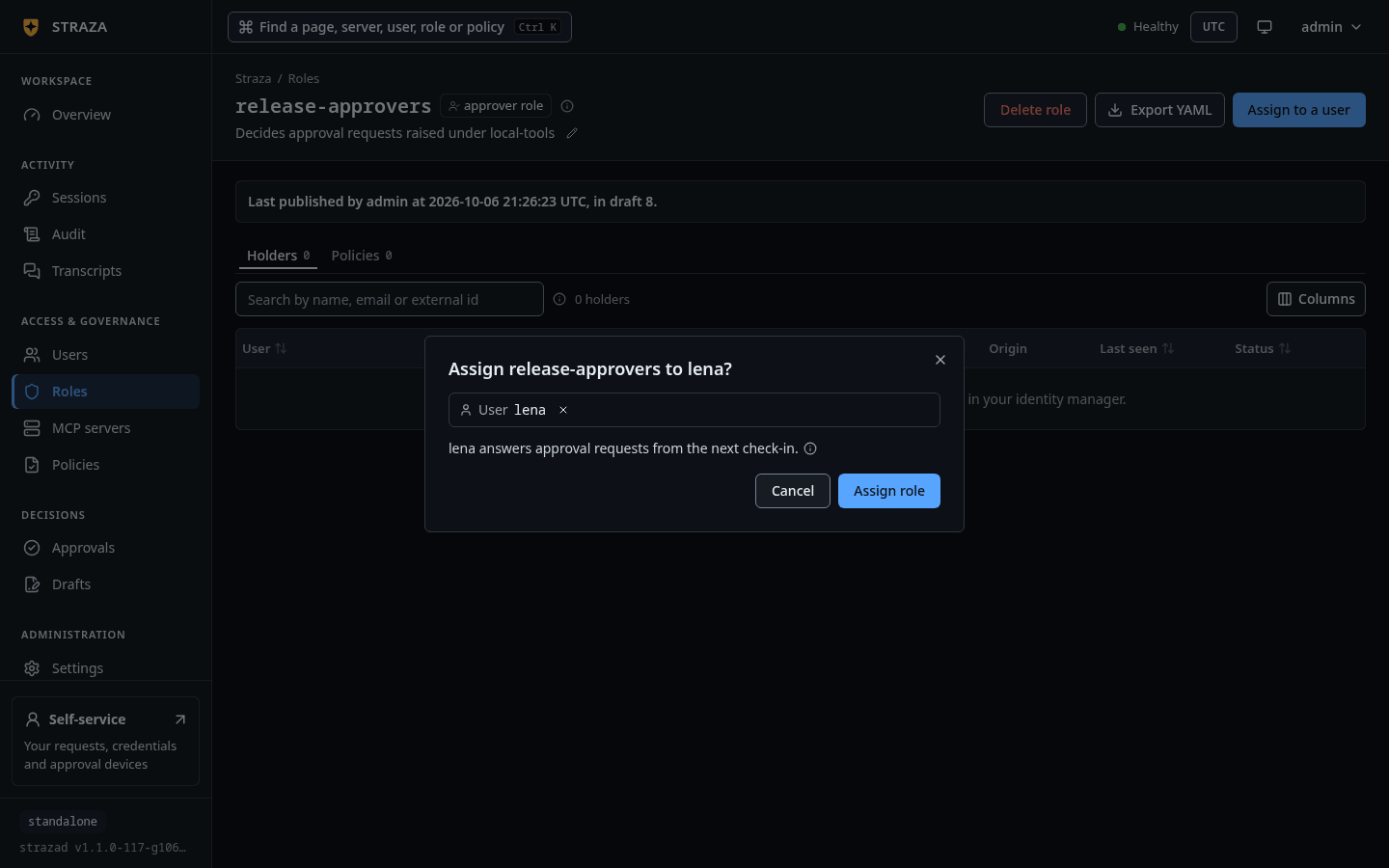
The same dialog on the approver role release-approvers, with lena picked under User and the button Assign role. Show the whole screen Pick omar under User and press Assign role. The role’s Areas tab shows what it opens:
audit,sessionsandtranscriptsatread, and every other area atnone, under the lineSet in strazad's config (admin.roleAreas). The console reads it and cannot change it.strazactl assign auditor --user omarassigned auditor to omarRun the same command a second time and the answer is
strazactl: assignment already exists, which is how you learn that a role is already held.Omar is a person the identity manager wrote into Straza, and he holds no other role.
Give the role to people. Only a person uses the admin API, so an AI agent or a service account is refused on every admin route, whatever role it holds. The refusal says that only a person can use the admin API or decide a request, and names the two ways around it: an admin API token that a person mints for automation, and the drafting tools of the built-in straza MCP server, which the role
straza-draft-configlists.Sign in as the holder and probe both sides
The holder signs in through the same device flow as any user. On every request the server resolves the session’s roles, unions their scopes through the map and checks the area of the route. Inside the area everything works as it does for root.
Omar signs in at
/console/with Sign in with a code. His sidebar holds Sessions, Audit and Transcripts, the three areas his role reads, and no other.Omar signs in with
strazactl login --server. This is omar, holding onlyauditor, listing sessions, trimmed to the first three rows:strazactl sessions listID USER HARNESS CLIENT ATTESTATION WIRING STATUS LAST SEEN 01a11331-3860-7408-94a6-ea1fbbb8cbb5 omar strazactl/v1.1.0-117-g106081a8 v1.1.0-117-g106081a8 none - active 2026-10-06 21:49:15 01a11330-c0b1-7ddc-8fd6-99bc446e34e0 mara claude-code v1.1.0-117-g106081a8 advisory unmeasured active 2026-10-06 21:48:44 01a11330-61e3-7c41-ac2b-4570d59264b7 carol console/1 - none - active 2026-10-06 21:48:23Outside the area the server names the scope that is missing, and the command exits 1:
strazactl users liststrazactl: session lacks scope identity:readstrazactl policy liststrazactl: session lacks scope policy:readIf this fails
requires role straza-admin, straza-global-mcp-admin or a role mapped in admin.roleAreas. The admin role of a server opens that server's own routes only.- None of the person’s roles is in the map, so the delegation itself is missing, not one scope of it. Check the map entry, and that the person holds the role.
Every change a delegated admin makes lands on the audit chain under that person’s own name, exactly as a root admin’s would, so delegation never makes an admin action anonymous.
What the console shows a delegated admin
The console sign-in page says Admin roles only. Anyone else lands on the self-service page, still signed in. After sign-in the sidebar shows only the areas the person’s scopes cover, and an address outside them is answered by a locked panel that names what the account does hold and offers a button into the first area it can open. All of that is display only, because the server checks the authority again on every request, so a hand-edited console cannot reach a route that the map does not open.
Undo it
To take the rights away from one person, delete their assignment of the role, or remove the membership in your identity manager. The next request from that person’s session is refused. A membership the identity manager wrote is mastered there, so remove it there as well. That is the same move for an area role and for a server’s own role.
On the person’s sheet, press Revoke on the role’s row, then confirm.
- Users
- omar
- Revoke
- Revoke role
strazactl unassign auditor --user omarunassigned auditor from omarTo retire an area delegation for everyone, remove the entry from the map and restart. The role then still exists and administers nothing. The kill switch that a sessions:write holder operates has its own guide, the Kill-switch runbook.
Walked on v1.1.0-117-g106081a8 on 2026-10-06. A throwaway standalone server in an Alpine 3.20 container on Linux, with the map entry added to its config file and the server restarted, and the refused entries checked by booting a second server on each. The admin's strazactl ran on an admin API token minted in the console, and omar and mara signed in with strazactl login from their own home directories, so every command on the page ran, the unassign included. In headless Chromium the console's assign step and the role's Areas tab were clicked as the root admin, and omar's sign-in, sidebar and locked panel were read. The refusal of AI agents on admin routes was checked against the code and not run, because no command hands an agent's session token to another client. Console screenshots show strazad v1.1.0-117-g106081a8, standalone.