The demo stack
Run Straza behind midPoint and Keycloak on one machine, and watch one disable in midPoint stop an AI agent in Straza and at its login.
- Who
- You, as alice, the admin of the stack
- Where
- A terminal and a browser, on the machine that runs Docker or through SSH tunnels to it
- Profile
- Enterprise
On this page
You bring up the demo stack on one machine, sign in as its admin alice, and disable an AI agent in midPoint. At the end you have seen that one change stop the agent’s Straza access and its Keycloak login together. The second half of the page is for the operator who keeps the stack running for a team.
The stack is one Docker Compose project. midPoint 4.10 is the identity manager, which creates every identity and provisions it into Straza over SCIM and into Keycloak, the identity provider that signs people in. strazad runs in the enterprise profile with the console embedded, with Postgres and NATS behind it. Three MCP servers and three agent containers live on the far side of the gateway, and only the gateway reaches the servers.
A seeder proves the loop at every boot. An AI agent is born in midPoint, lands in Straza over SCIM and gets its login in Keycloak, with no manual step. A landing page on port 8400 hands you the addresses, the logins, walkthroughs that name the guide behind each step, and these docs.
Before you begin
- Docker Engine with the compose plugin, on a machine with 8 GB of memory and four processors, the size the stack was tested on. Requirements and sizing lists what a deployment beyond this demo needs.
- A clone of the Straza repository, and
strazactlon your PATH from Install. curlandjq.
The repository carries the connector jar midPoint loads to reach Straza, pinned by checksum. midPoint must discover it, or the seeder stops with an error. The midPoint MCP server runs from its released image, ghcr.io/strazahq/midpoint-mcp-server, pinned by digest, so it needs no checkout. Its release workflow attests how the image was built, which gh attestation verify oci://<image> --owner Strazahq checks.
Run it on a network you trust
The stack serves plain HTTP, lowers the attestation minimum to none and lets the seeder sign in with a password grant. Every login in it is public. Run it only on a network you trust, or in the hardened shape that Demo defaults and the hardened shape describes.
Bring the stack up
CLI onlyThe stack starts from a terminal. The console opens once the seeder has finished.
From the repository root, start the stack and follow the seeder.
deploy/compose/eval-stack/up.sh
docker compose -f deploy/compose/eval-stack/compose.yaml logs -f eval-seed
The launcher is
up.sh, orup.ps1on Windows. It picks your machine’s default-route IPv4 address and hands it to strazad as the advertised approver URL, the address the Straza approver app reaches for approvals, so a phone can scan a working QR. It then runsdocker compose -f compose.yaml up -d --buildwith the base file alone, so the ports are open on every interface.A first boot builds the strazad, demo-tools, agent and harness images from source. It pulls Keycloak, midPoint and the other third-party images, initializes the midPoint schema and compiles the Keycloak connector from source. Later boots reuse all of it. The first-boot time and memory were not measured for this page.
You should see
The seeder finishes last, and near its end its log prints
EVAL STACK READY.The lines below are trimmed to the ones that matter, with the lines between the business roles and the addresses left out:
[seed] alice is in Straza with straza-admin assigned by midPoint ✔ (origin: the identity manager)
[seed] ivan holds straza-enroll-browser and mobile from midPoint ✔ (deciders can self-enroll)
[seed] joe-java-developer-agent holds developer, assigned by midPoint ✔ (the developer role)
[seed] sam-sre-agent holds operator, assigned by midPoint ✔ (the operator role)
[seed] seed-bootstrap's bootstrap admin assignment removed (alice's assignment from the identity manager is the admin now)
[seed] seed-bootstrap disabled in Keycloak
[seed] ============================================================
[seed] EVAL STACK READY - the agent workforce was born in midPoint and
[seed] provisioned into Straza (SCIM), zero manual steps: joe (supervised
[seed] Java developer agent, the harness identity and chat face, with an
[seed] explicit Keycloak login) holds the developer role and sam (autonomous
[seed] SRE agent, key lane only) the operator role. Both are sponsored by
[seed] alice: Straza sends their gated calls to her phone.
[seed] Business roles: developer (joe) composes demo-tools-sandbox, views-demo-tools and midpoint-self-service,
[seed] operator (sam) composes demo-tools-readers and midpoint-operations, and
[seed] analyst (nobody yet) composes demo-tools-readers and midpoint-self-service.
[seed] Landing page: http://localhost:8400  <- start here
[seed] Console:  http://localhost:8420/console/   (alice / alice)
[seed] midPoint: http://localhost:8087/midpoint   (administrator / $MP_ADMIN_PASSWORD)
Sign in as alice
Open every address of the stack as
localhost, not127.0.0.1. The stack advertises itself aslocalhost, and Keycloak binds its sign-in cookie to that name. alice is an administrator because midPoint assigned her the admin role.Open the landing page at
http://localhost:8400. It lists the stack’s accounts and services with copy buttons, and walkthroughs that each say who you act as, what they need and what you see. Then open the console athttp://localhost:8420/console/.- Press Sign in with a code. The console shows a code and the button Open the sign-in page.
- Press Open the sign-in page. Keycloak opens.
- Sign in as
alicewith the passwordalice, and grant the device flow access.
You should see
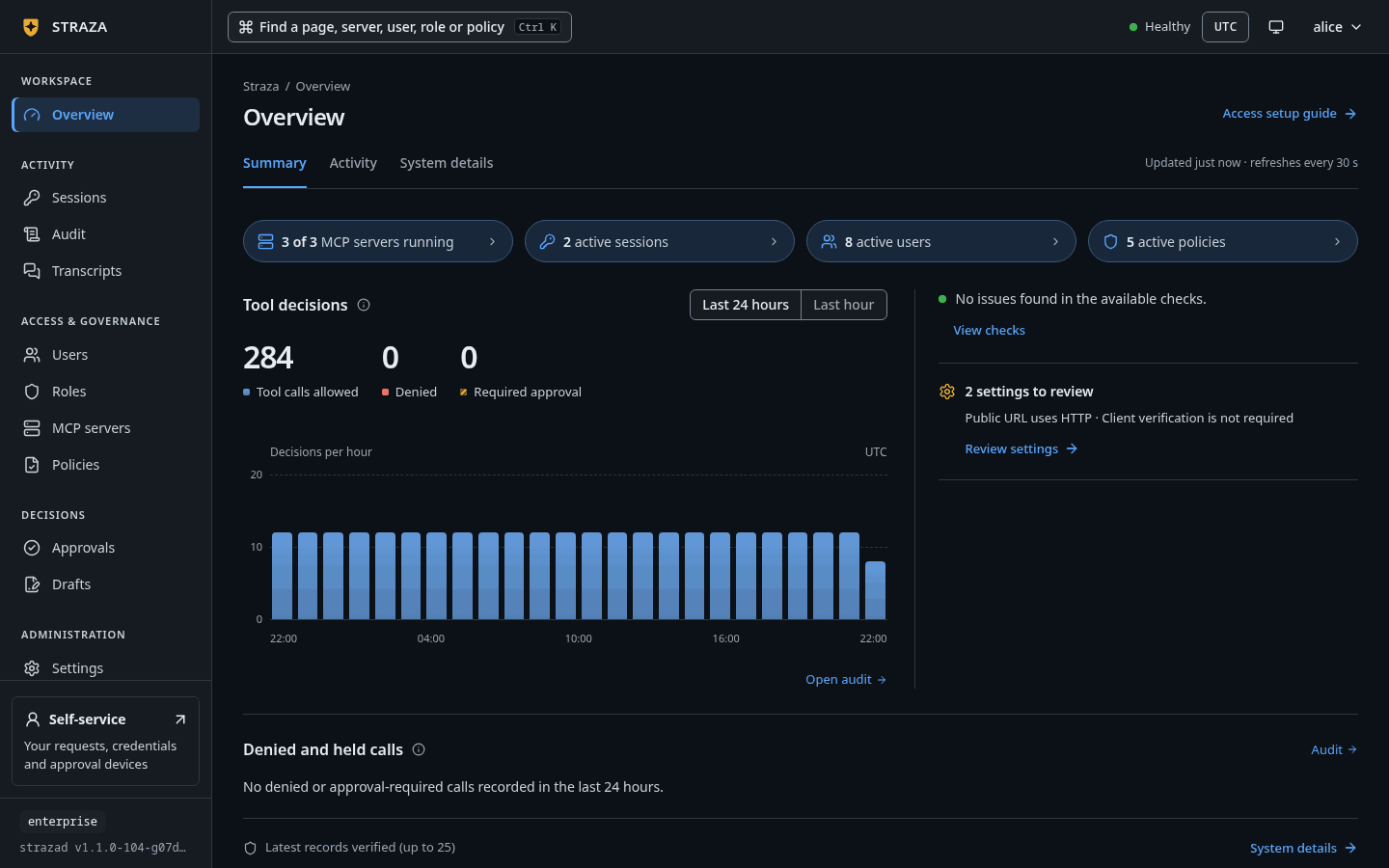
The console opens on Overview, on its Summary tab.
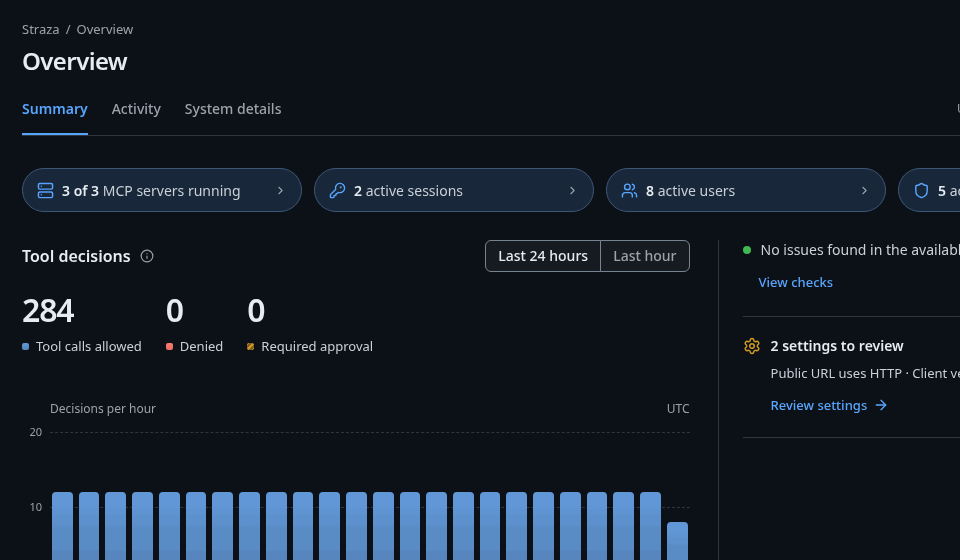
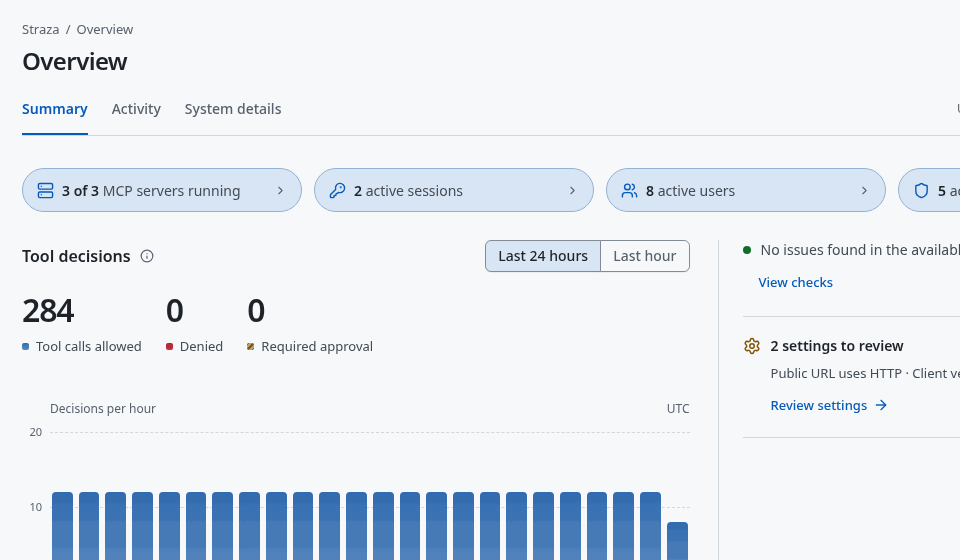
The Summary tab counts the MCP servers running of the total, the active sessions, the active users and the active policies. Show the whole screen Once your browser has re-hashed the newest audit records and the chain held, the tab ends in the line
Latest records verified (up to 25).Log in with the admin command line.
loginneeds the server address once and remembers it.strazactl login --server http://localhost:8420Open the address it prints, sign in as
alicewith the passwordalice, and press Yes on the page that asks whether to grant Straza the device flow access. Keycloak then says “Signed in”.You should see
Logged in as alice.and a note that asks you to keep this login away from coding agents.Signing in at your identity provider: http://localhost:8480/realms/straza Open http://localhost:8480/realms/straza/device?user_code=MTZN-EPBL and confirm code MTZN-EPBL Logged in as alice. note: this login can change Straza's configuration. Keep it away from coding agents. Automation uses an admin API token in STRAZA_API_TOKEN, and an agent proposes config changes through the built-in straza MCP server.If this fails
strazad is unreachable, state unknown. Check the server and retry.- Look at the address bar. A sign-in from
127.0.0.1fails with this message even while the server answers. Open the console athttp://localhost:8420/console/.
Confirm the version
Before you trust anything, ask the server what it is.
Look at the foot of the sidebar. It names the profile and the strazad build, and its tooltip adds the commit.
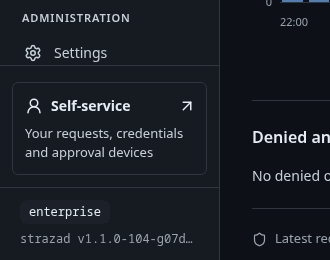
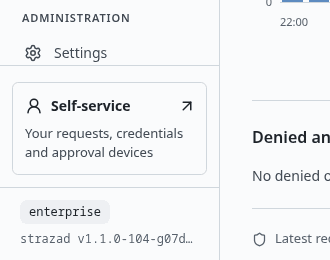
The profile is enterprise, and the line under it names the build. Show the whole screencurl -s http://localhost:8420/version{"version":"v1.1.0-104-g07d2df0e","commit":"07d2df0e1c3ef4c0057d2dd204b41b9180aefc75","go":"go1.26.8","os":"linux","arch":"amd64","profile":"enterprise","runtimes":["remote"],"approver":{"public_url":"https://127.0.0.1:8443","tls_spki_pin":"sha256/FWLhewF1uqb8mj2+J0OTVM2TuIE8vNQdt5lYjwWmpy4=","cert_not_after":"2028-12-29T16:18:42Z","auto_minted":true,"cert_file":"/var/lib/straza/approver-tls/cert.pem"}}You should see
versionandcommitname the build you started, andprofileisenterprise.The
approverblock describes the TLS listener for phone approval, and this tutorial does not use it. On a stack the launcher started, itspublic_urlis the address the launcher picked. The answer above came from a stack started with the four files of the hardened shape below, so itspublic_urlis the loopback address that shape pins.List what the seeder made
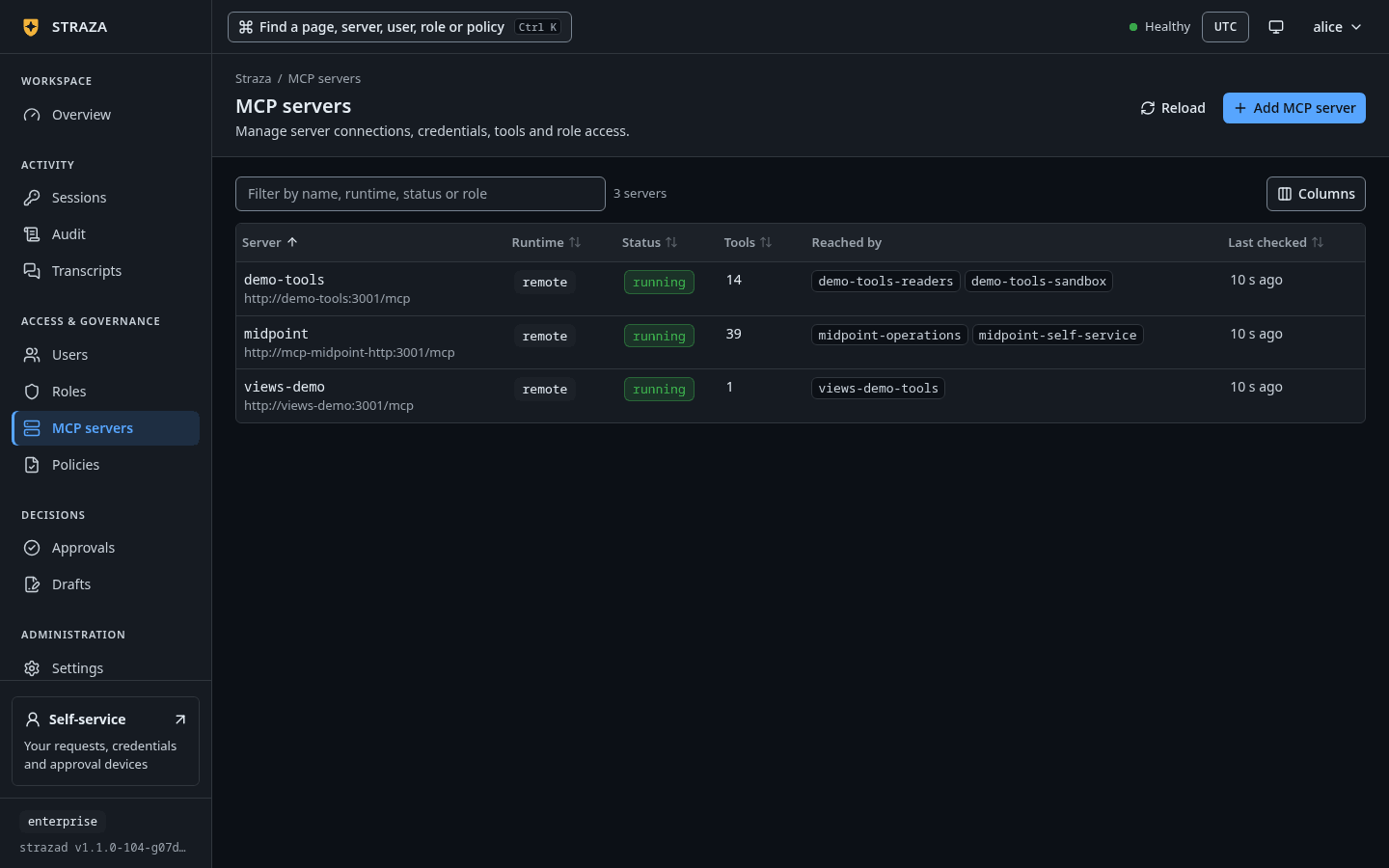
Open Roles, MCP servers and Policies in the sidebar, one after the other.
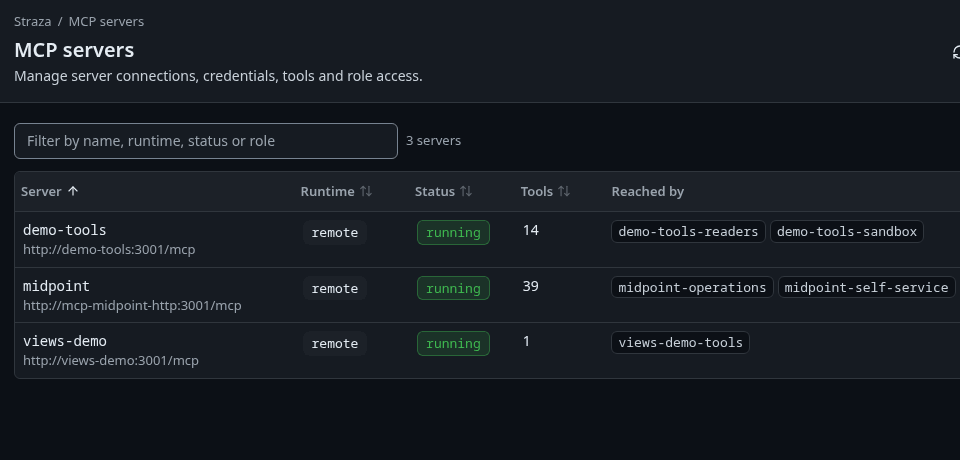
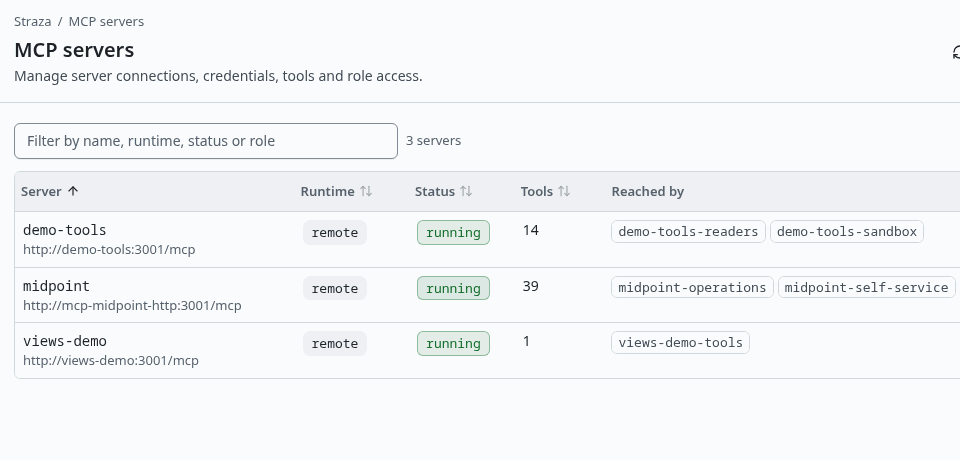
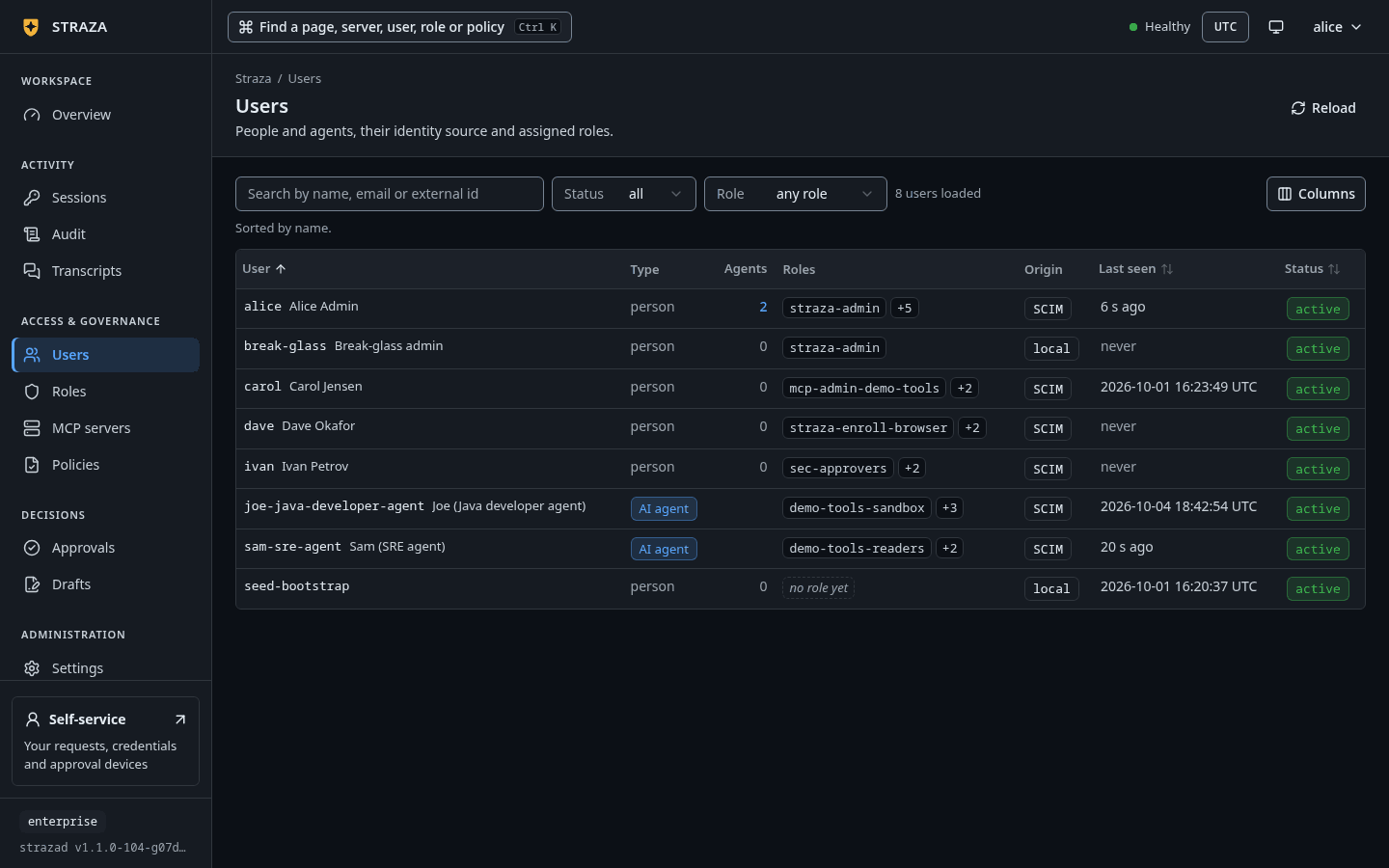
Three MCP servers, each running, with the roles that reach it. Show the whole screen Then open Users. Every person and agent whose origin is
SCIMwas created in midPoint and provisioned from there.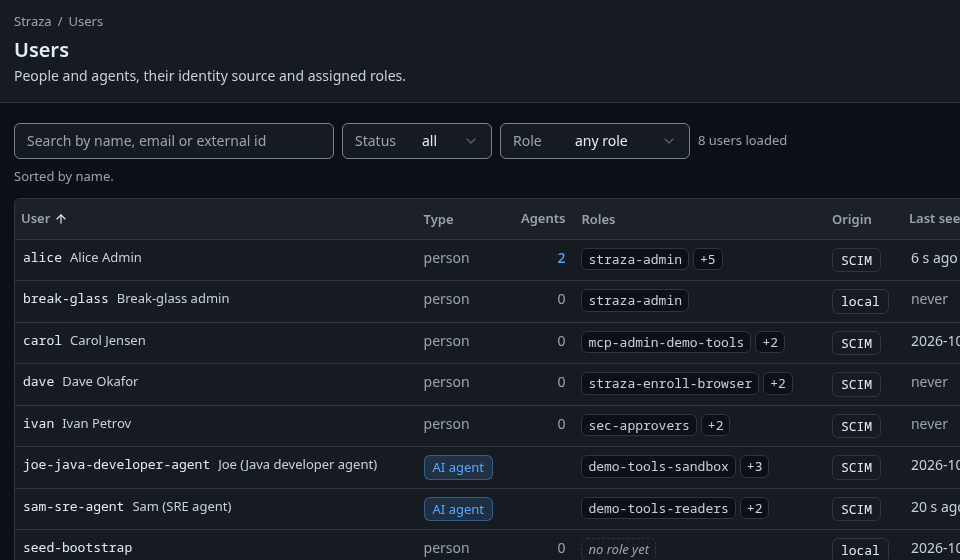
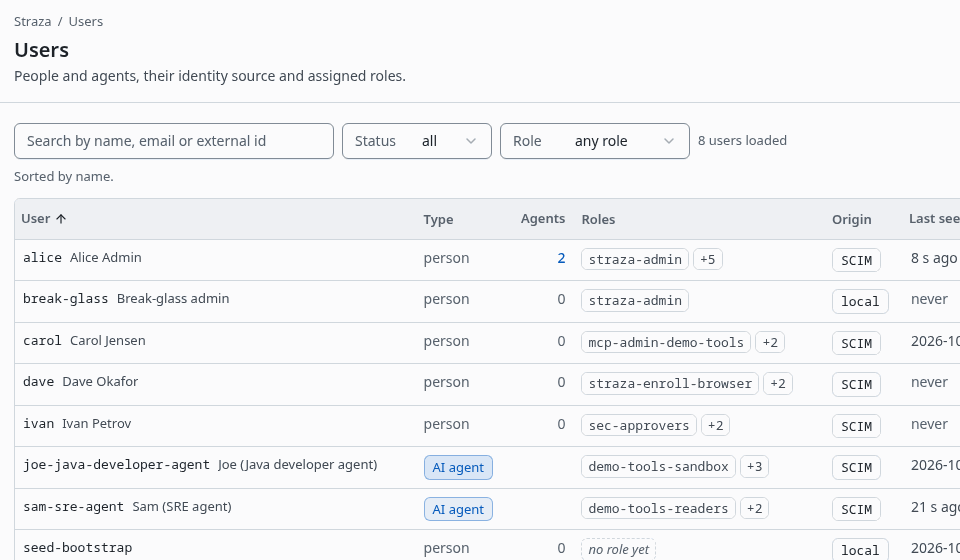
The people and agents the seeder made, with the origin of each. Show the whole screen List the roles, the MCP servers and the policies.
strazactl roles list
strazactl apps list
strazactl policy list
The listings are trimmed to what the seeder made, and the role ids are left out.
NAME                     KIND         SERVER      DESCRIPTION
analyst                  business     -           The analyst role: composes demo-tools-readers and midpoint-self-service. Nobody holds it at boot; assign it to nina in midPoint and watch her land in Straza.
auditor                  straza       -           Read-only oversight: audit, sessions and transcripts. Opens the console, never agent tools.
demo-tools-readers       application  demo-tools  Read-only reach into the demo-tools server: the tools that only read or compute, named one by one. Defined by that server's own admin and assigned by the identity manager.
demo-tools-sandbox       application  demo-tools  Every tool of the demo-tools server, tools added later included. Composed by the developer role; get-sum is a hold and get-env is a ticket in demo-tools-sandbox-access.
developer                business     -           The developer role: composes demo-tools-sandbox, every tool of the demo-tools server, views-demo-tools, the MCP Apps example server, and midpoint-self-service, the midPoint reads plus request_role. joe holds it from midPoint.
mcp-admin-demo-tools     straza       -           Administers the MCP server demo-tools: its connection, credentials, settings and health, never its removal. It opens the console's MCP servers area for that server only.
mcp-admin-midpoint       straza       -           Administers the MCP server midpoint: its connection, credentials, settings and health, never its removal. It opens the console's MCP servers area for that server only.
mcp-admin-views-demo     straza       -           Administers the MCP server views-demo: its connection, credentials, settings and health, never its removal. It opens the console's MCP servers area for that server only.
midpoint-operations      application  midpoint    Every tool of the midPoint server. Composed by the operator role; every write waits for the person behind the call in midpoint-operations-access.
midpoint-self-service    application  midpoint    The midPoint reads plus the self-service pair whoami, ping, list_requestable_roles and request_role. Composed by the developer and analyst roles; request_role needs approval in midpoint-self-service-access.
operator                 business     -           The operator role: composes demo-tools-readers, the read-only tools the demo-tools server's admin defined, and midpoint-operations, every midPoint tool with every write needing approval. sam holds it from midPoint.
sec-approvers            approver     -           The deciders of approval requests for governed agents. Reaches no tools. The identity manager assigns and certifies its holders.
straza-admin             straza       -           Straza administration
straza-draft-config      straza       -           Lets an agent propose config drafts through the built-in straza MCP server's tools straza__draft_submit and straza__draft_status. A person publishes them. It opens no console area, and straza-admin does not include it.
straza-enroll-browser    straza       -           May enroll a signed-in browser as an approval device.
straza-enroll-mobile     straza       -           May enroll their own phone as an approval device.
straza-global-mcp-admin  straza       -           Administers every MCP server: registration, changes, credentials and reach. It opens the console's MCP servers area, never agent tools.
views-demo-tools         application  views-demo  Every tool of the views-demo server, the MCP Apps example whose get-time opens a clock view. Composed by the developer role.
NAME        VERSION    RUNTIME  STATUS   REASON  SOURCE  TOOLS  REACHED BY                                 CHECKED
demo-tools  2026.8.31  remote   running  -       api     14     demo-tools-readers,demo-tools-sandbox      10s ago
midpoint    0.6.0      remote   running  -       api     39     midpoint-operations,midpoint-self-service  10s ago
views-demo  2.0.3      remote   running  -       api     1      views-demo-tools                           10s ago
NAME                          PRIORITY  STATUS  ID
agent-guardrails              150       Live    01a0f844-67f1-7749-b8fe-244b01441916
demo-tools-readers-access     100       Live    01a0f844-6779-7965-872f-a37289bf3957
demo-tools-sandbox-access     100       Live    01a0f844-6620-70dd-b1ee-9bcff162f174
midpoint-operations-access    100       Live    01a0f844-66fa-7cc5-9870-2c23b2f66dd5
midpoint-self-service-access  100       Live    01a0f844-6698-70e5-ad88-49caa7775fd1
Then list the users. The listing is trimmed to the seeded rows.
strazactl users listUSERNAME STATUS ORIGIN EMAIL ID alice active scim alice@example.com 01a0f844-189a-756d-9121-8fa16f63c02d break-glass active local 01a0f842-d407-7c60-aea5-0dca31527abd carol active scim carol.jensen@example.com 01a0f844-7448-704f-a6c5-3428907b14a5 dave active scim dave.okafor@example.com 01a0f844-6ff1-77ac-b6cf-29bc762d2b6c ivan active scim ivan.petrov@example.com 01a0f844-2843-721c-a87f-901131ff70d5 joe-java-developer-agent active scim joe@agents.example.com 01a0f844-31c7-7c0f-aef7-4562b116696c sam-sre-agent active scim sam@agents.example.com 01a0f844-365a-78ed-85f3-4d47e0b9eff5 seed-bootstrap active local seed-bootstrap@example.invalid 01a0f843-4ddb-7174-9611-858816525b56Every person and agent with the origin
scimwas created in midPoint and provisioned from there.Four kinds of role appear.
developer,operatorandanalystare business roles that people hold. Each of them composes application roles, and those application roles are what the active PolicySets match. An application role reaches one server and belongs to it, so the server column names that server and midPoint shows the role as that server’s role.sec-approversdecides approvals and holds no tools. A Straza role such asauditorcarries rights inside Straza itself and no agent tools.The seeder installed the three MCP servers through the admin API, so the console and
strazactlcan change them:demo-toolsis a reference MCP server that no port publishes.- The identity manager’s own MCP server is
midpoint. Its tools run as the signed-in person, and its four views, the approval inbox, Get access, My requests and My team’s access, are turned on. views-demois the official MCP Apps example server with its views turned on. A chat app that shows MCP Apps views renders its clock card through/mcp/views-demo, as Show MCP Apps views walks through.
The seeder also removed the admin role from its own bootstrap account and disabled that account’s login in Keycloak. The cast below says who each person and agent is and what they hold.
Disable joe in midPoint
joe-java-developer-agentwas born in midPoint, provisioned into Straza over SCIM and given a Keycloak login by an explicit assignment. This step runs in midPoint, the master of every identity in the stack, so neither the Straza console norstrazactltakes part.Disable him over midPoint’s REST interface with the object id the seed objects carry. In the midPoint GUI the path is Users, then his account, then Disable. The midPoint administrator password is the lab default from
compose.yaml,StrazaEval5ecr3t!, which the landing page also lists.curl -u 'administrator:StrazaEval5ecr3t!' -H 'Content-Type: application/json' -X PATCH \ -d '{"objectModification":{"itemDelta":[{"modificationType":"replace","path":"activation/administrativeStatus","value":"disabled"}]}}' \ http://localhost:8087/midpoint/ws/rest/users/b6f9f2c8-0d5a-4e77-9a1e-9d3c0e5a1c4eYou should see
Nothing. midPoint answers 204 No Content and then provisions the change to both of its resources, Straza and Keycloak.
What the disable starts in Straza. midPoint disables joe’s Keycloak login from the same status. See joe stop in Straza
A few seconds after the disable, Straza lists joe as disabled. The audit chain holds one identity event with the origin and the reason the identity manager gave, and a count of the sessions it revoked. That count is zero here, because joe had no live session at that moment.
On Users, set the Status filter to
disabled.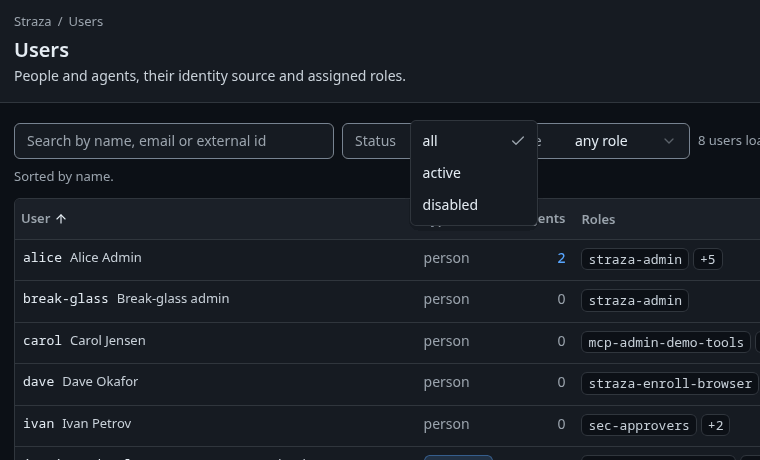
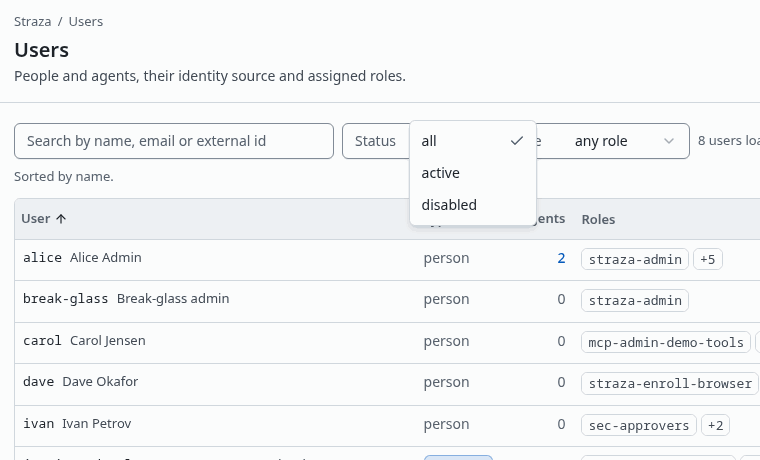
The Status filter has three choices: all, active and disabled. Show the whole screen You should see
joe-java-developer-agentis in the list.Then open his sheet and follow its audit trail.
- Users
- joe-java-developer-agent
- Audit trail: open
You should see
Audit opens on joe’s records, and the newest is the
identityrecorduser.killed. Open it, and The record as stored shows the originscimand the reasondeactivated via SCIM.strazactl users listUSERNAME STATUS ORIGIN EMAIL ID joe-java-developer-agent disabled scim joe@agents.example.com 01a0e97b-cc2e-7555-926b-25954f31e3dcThis listing is trimmed to his row. Then read the end of the audit chain:
strazactl audit tail --limit 5#863 [joe-java-developer-agent] {"data":{"action":"user.killed","origin":"scim","reason":"deactivated via SCIM","sessionsRevoked":0,"user":"01a0e97b-cc2e-7555-926b-25954f31e3dc"},"id":"1084f3a4-3859-47e5-ae41-39ce6134ed92","source":"strazad/360f40c4-5b3b-4e54-8208-4a526e8d71dd","specversion":"1.0","time":"2026-09-28T20:36:07.443816709Z","type":"straza.audit.identity"}You should see
The record’s
actionisuser.killedand itsoriginisscim. The other records of that tail are left out here.Confirm the Keycloak login is off
The same midPoint change also disabled joe’s login. Ask the Keycloak admin API, with the lab admin login
admin/admin.KCT=$(curl -s -d client_id=admin-cli -d username=admin -d password=admin -d grant_type=password http://localhost:8480/realms/master/protocol/openid-connect/token | jq -r .access_token) curl -s -H "Authorization: Bearer $KCT" 'http://localhost:8480/admin/realms/straza/users?username=joe-java-developer-agent&exact=true' | jq '.[0].enabled'falseDisabling a login in Keycloak alone stops new sign-ins and leaves running Straza sessions alive. Deactivating over SCIM alone leaves the login usable. A leaver flow has to trigger both, and it does here because midPoint provisions both resources from the one status.
Enable joe again
Send the same request with the value
enabled.curl -u 'administrator:StrazaEval5ecr3t!' -H 'Content-Type: application/json' -X PATCH \ -d '{"objectModification":{"itemDelta":[{"modificationType":"replace","path":"activation/administrativeStatus","value":"enabled"}]}}' \ http://localhost:8087/midpoint/ws/rest/users/b6f9f2c8-0d5a-4e77-9a1e-9d3c0e5a1c4eYou should see
A few seconds later Straza lists him as active again, the Keycloak query answers
true, and the audit chain gains a record with the actionuser.reactivatedand the originscim.The sessions the disable revoked stay revoked. His next session start opens a new one without enrolling again.
Next
- Concepts explains the pieces you watched: identities and their origin, roles and their kinds, the PolicySet, the gateway and the audit chain.
- The landing page’s walkthroughs decide a ticket, delegate one server and bring a new AI agent in from midPoint, each on this stack.
- When you are done, Tear it down at the end of this page removes the stack.
Run the stack for a team
This half of the page is for the operator who keeps the stack running for other people. It explains what runs, who the seeded accounts are, which defaults are lab shortcuts, and how to bring the stack up, down and back without losing its state.
What runs
List every container, the one-shot jobs that have exited included, from the stack directory. The command passes the four compose files of the hardened shape, which Pass the same files every time explains. On a stack that up.sh started, pass compose.yaml alone.
cd deploy/compose/eval-stack
docker compose -f compose.yaml -f compose.loopback.yaml -f compose.siem.yaml -f compose.demo.yaml ps -a --format 'table {{.Service}}\t{{.Image}}\t{{.Status}}\t{{.Ports}}'
SERVICE IMAGE STATUS PORTS
agent-keys-init busybox:1.36 Exited (0) 5 days ago
connector-jar curlimages/curl:8.7.1 Exited (0) 2 days ago
demo straza-eval-demo Up 5 days
demo-tools straza-eval-demo-tools Up 5 days
docs-build ghcr.io/gohugoio/hugo:v0.165.0@sha256:608a19e34f86de36773503adbaab174fc28a6e338dc7904e03c70320b003a153 Exited (0) 5 days ago
docs-publish python:3.13-alpine Exited (0) 5 days ago
elasticsearch docker.elastic.co/elasticsearch/elasticsearch:8.14.3 Up 5 days (healthy) 127.0.0.1:9200->9200/tcp, 9300/tcp
eval-seed alpine:3.20 Exited (0) 2 days ago
kc-connector-build maven:3.9-eclipse-temurin-17 Exited (0) 2 days ago
keycloak quay.io/keycloak/keycloak:26.0 Up 5 days (healthy) 8443/tcp, 9000/tcp, 127.0.0.1:8480->8080/tcp
kibana docker.elastic.co/kibana/kibana:8.14.3 Up 5 days 127.0.0.1:5601->5601/tcp
kibana-setup docker.elastic.co/elasticsearch/elasticsearch:8.14.3 Exited (0) 5 days ago
landing nginx:1.27-alpine Up 5 days 127.0.0.1:8400->80/tcp
mcp-midpoint-http ghcr.io/strazahq/midpoint-mcp-server:0.6.0@sha256:0b24ff42bb60eeb78a756f5db8b24e25a3cfc7887517cf8151e9c4e957194a00 Up 2 days
midpoint evolveum/midpoint:4.10.3-alpine Up 5 days (healthy) 127.0.0.1:8087->8080/tcp
midpoint-db postgres:16-alpine Up 5 days 5432/tcp
midpoint-init evolveum/midpoint:4.10.3-alpine Exited (0) 2 days ago
midpoint-partition-guard postgres:16-alpine Exited (0) 2 days ago
nats nats:2 Up 5 days 4222/tcp, 6222/tcp, 8222/tcp
siem-setup docker.elastic.co/elasticsearch/elasticsearch:8.14.3 Exited (0) 11 hours ago
straza-data-init busybox:1.36 Exited (0) 11 hours ago
straza-db postgres:16 Up 5 days (healthy) 5432/tcp
strazad straza-eval-strazad Up 11 hours 127.0.0.1:8420->8420/tcp, 127.0.0.1:8443->8443/tcp
uni-connector-build curlimages/curl:8.7.1 Exited (0) 2 days ago
views-demo straza-eval-views-demo Up 5 days
straza-harness straza-eval-straza-harness Up 5 days
agent-sam straza-eval-agent-sam Up 5 days (healthy)The long-running services form these groups:
| Group | Services |
|---|---|
| Identity | keycloak, Keycloak 26 in dev mode, which imports the realm straza at boot. midpoint, midPoint 4.10.3, with its own midpoint-db. |
| Straza | strazad in the enterprise profile with the console embedded, straza-db, and nats. NATS publishes no port, because agents receive the kill-switch push over strazad’s own /v1/push endpoint. |
| The governed side | demo-tools, the MCP reference server that only the gateway can reach. views-demo, the MCP Apps example server, whose views a chat app reaches only through /mcp/views-demo. mcp-midpoint-http, the midPoint MCP server that runs every call as the signed-in person. landing, the nginx behind the landing page and the published docs under /docs/. |
| Agents | agent-sam, the always-on autonomous agent. straza-harness, a pinned Claude Code in a box that you drive with docker exec. demo, the scripted chat face on 127.0.0.1:8477. |
| SIEM, from the siem overlay | elasticsearch and kibana. |
Everything listed as Exited (0) is a one-shot job that ran to completion while its dependents waited on it. A failed job therefore stops the boot instead of leaving a half-built stack. These are the jobs:
- The init jobs fix volume ownership, create the midPoint schema and pre-create the shadow partitions that midPoint 4.10.3 otherwise creates in the wrong order.
- The build jobs compile the two connectors and refuse a vendored jar whose checksum does not match.
docs-buildanddocs-publishrender these docs, comment-free, on everyup.siem-setupandkibana-setupprepare the ingest pipeline and the dashboards.eval-seedis the seeder, which Bring it up, down and back describes.
The cast
Every person and agent except two local accounts is born in midPoint and provisioned from there. The seeder works in this order:
- It signs in as the transient
seed-bootstrapuser and mints the admin API token midPoint holds under the namemidpoint. - Next it creates the Straza-born roles: the business roles
developer,operatorandanalyst, the approver rolesec-approversand the Straza roleauditor. - It imports the midPoint objects and waits for midPoint to provision the working agents.
- Each application role is created on the one server it reaches, with its access row:
demo-tools-sandboxondemo-tools,views-demo-toolsonviews-demo, andmidpoint-self-serviceandmidpoint-operationsonmidpoint. - It registers the agents’ Ed25519 public keys and activates the policy set of each application role together with
agent-guardrails. - dave gets the role that administers every MCP server, and carol the role the
demo-toolsserver names at its own registration. - Last, the seeder locks itself.
Sponsorship is the accountability edge. alice sponsors joe and sam, so when either raises a gated call, Straza sends the request to the approver’s phone and to the self-service page. joe is supervised and sam is autonomous, and an autonomous agent can never approve its own request.
| Name | Who | Access in midPoint | Login |
|---|---|---|---|
| alice | employee, the accountable person, manager of dev-ops | admin and approver roles: straza-admin, sec-approvers, the enroll roles, sponsor of joe and sam |
Keycloak, alice / alice |
| ivan | employee, the second approver | approver role: sec-approvers and a Keycloak login, no tools |
Keycloak, ivan / Ev4l-St4ck!26 |
| joe-java-developer-agent | supervised AI agent, the harness identity and the chat face | Straza account, the developer business role, a Keycloak login, member of dev-ops |
Ed25519 key for sessions, Keycloak password Ev4l-St4ck!26 for the chat face |
| sam-sre-agent | autonomous AI agent driving the agent-sam container |
Straza account and the operator business role |
Ed25519 key lane only, no password anywhere |
| nina-data-analyst-agent, pam-personal-agent | an autonomous AI agent and carol’s personal agent, both without roles | nothing until you assign a role in midPoint | none |
| jana | employee, the new hire of the scripted demo | no roles by design | none |
| carol | employee in dev-ops, the server admin of the demo | AR:mcp-admin-demo-tools, the role the demo-tools server names at its registration, plus the governed Straza account and a Keycloak login |
Keycloak, carol / Ev4l-St4ck!26 |
| dave | employee, the global MCP admin of the demo | BR:Straza-global-mcp-admin-access, the midPoint role that hands out straza-global-mcp-admin over every MCP server, plus the governed Straza account and a Keycloak login |
Keycloak, dave / Ev4l-St4ck!26 |
| erin, frank, grace, judy | employees in midPoint only, frank a manager | none | none |
| heidi | external contractor | no roles | none |
| mcp-service | technical account of the midPoint MCP server | two scoped midPoint roles, no superuser | midPoint REST only, password set in the seed objects |
| seed-bootstrap | transient local admin the seeder drives | admin during seeding, then locked and disabled | password set in the seed objects, dead after seeding |
| break-glass | local emergency admin strazad creates on every store | standing admin | printed once in the strazad log at first boot, used only on the emergency sign-in |
Every login in the stack is public by design, which is the reason the hardened shape below binds every port to loopback. The console and the CLI sign in through Keycloak as alice / alice. The landing page’s Accounts table lists the logins of alice, ivan, carol, dave and joe beside those of the midPoint, Keycloak and Kibana administrators. Its lab shortcuts name the mcp-service and seed-bootstrap accounts as committed too, without printing their passwords. Both passwords live only in the seed objects, and operating the stack never needs them.
Demo defaults and the hardened shape
The landing page ends with its lab shortcuts, the eval-only choices that keep the demo short. Each one is a fact about this stack. The hardened shape changes some of them and leaves the rest in place:
| Lab shortcut | In the hardened shape |
|---|---|
| Plain HTTP everywhere. | Stays. The traffic then travels only on the host’s loopback and inside your SSH tunnel. TLS for a deployment that faces a network is the subject of TLS and exposure. |
The minimum attestation is lowered to none, so a plain straza enroll works. The enterprise default managed refuses it until a managed install has registered its hash. |
Stays. The running server reports STRAZA_MIN_ATTESTATION=none in both shapes. |
Direct-access grants are on for the straza client, so the seeder and joe’s chat face sign in with a password and no browser. joe’s chat-face password is committed in his seed object, and the Keycloak connector authenticates as the master-realm admin. |
Stays. The agents’ own sessions ride Ed25519 keys generated inside their containers and never committed. |
midPoint masters the Straza roles straza-admin, straza-enroll-browser and straza-enroll-mobile. |
Stays, because this is the designed enterprise shape for production too. |
| The ports are open on every interface. | Bound to the host’s loopback, and reached over SSH. |
The base file publishes Keycloak on 8480, strazad on 8420 and 8443, the landing page on 8400 and midPoint on 8087, all on every interface. Docker’s own iptables rules run before firewalld or ufw, so a host firewall does not cover them. The loopback overlay, compose.loopback.yaml, rebinds those ports to 127.0.0.1 and pins the advertised approver URL to https://127.0.0.1:8443. Elasticsearch, Kibana and the demo chat face bind loopback on their own.
On an internet-reachable host, never run the launcher. Start the base file with its overlays instead, from the stack directory:
cd deploy/compose/eval-stack
docker compose -f compose.yaml -f compose.loopback.yaml -f compose.siem.yaml -f compose.demo.yaml up -d --build
The siem overlay adds Elasticsearch and Kibana. The demo overlay builds from a checkout of the straza-agents-demo repository beside this one, and that repository is not public. Without that checkout, leave -f compose.demo.yaml out of this command and of every later one.
Then reach the stack from your workstation over SSH. tunnels.sh user@host on Linux or macOS and tunnels.bat user@host on Windows forward 8400, 8420, 8443, 8480, 8087, 5601 and 8477. The tunnels need nothing else on your workstation, and the browser still opens every address as localhost.
Pass the same files every time
Two shapes exist, and you keep the one you started with. On a network you trust, the launcher starts the base file alone. In the hardened shape, every later up, ps, logs and down passes the files you started with, in the order base, loopback, siem, demo. The file chain decides what strazad reads.
- The base file mounts
straza.rs-mode.yamlat/etc/straza/straza.yaml, and the siem overlay mountssiem/straza-siem.yamlat the same container path. Compose merges volumes by container path, so the later file wins, and strazad reads exactly one config file. That second file repeats the OAuth and admin blocks of the first and adds thesinkslist that posts every audit and revocation event to Elasticsearch. - Drop the siem file from one command, and the next recreate mounts the base config again. The sink is gone and nothing reports it.
- Drop the demo file, and compose forgets the
demoandstraza-harnessservices.upskips them,downorphans them, and the demo steps that need them stop working.
Confirm which config file the running server holds:
docker inspect straza-eval-strazad-1 --format '{{range .Mounts}}{{if eq .Destination "/etc/straza/straza.yaml"}}{{.Source}}{{end}}{{end}}' | sed 's#.*/eval-stack/##'siem/straza-siem.yamlThe sink is alive when the index fills:
curl -s -u elastic:strazasiem http://127.0.0.1:9200/straza-events/_count{"count":2010,"_shards":{"total":1,"successful":1,"skipped":0,"failed":0}}It counts the audit and revocation events delivered so far, and it grows with every decision.
Bring it up, down and back
The seeder is the last job to finish, and its log is the boot’s verdict. Every line carries the [seed] prefix. WARNING marks population that did not land and never fails the seed. FATAL ends the run with a non-zero exit, so ps -a shows eval-seed as Exited (1). The log keeps every run of the container, so read it from the end and expect the block that opens with EVAL STACK READY:
docker compose -f compose.yaml -f compose.loopback.yaml -f compose.siem.yaml -f compose.demo.yaml logs --no-log-prefix eval-seed | grep -n -E 'READY|FATAL|WARNING'153:[seed] EVAL STACK READY - the agent workforce was born in midPoint andYou should see
The READY line, and no WARNING or FATAL line.
A seeder that dies is run again with up eval-seed on the same files, and it converges, because every step is idempotent. Roles answer that they are already present, earlier tokens are revoked and minted again, and a PolicySet that exists is never touched.
State lives in twelve named volumes. down without -v removes every container and keeps everything that matters:
- both Postgres stores and midPoint’s home
- strazad’s data volume with the key-encryption key, the auto-minted approver TLS pair, the WebPush key and the relay token
- the agents’ private keys and enrollments
- the Maven cache and the docs
The next up -d brings the same stack back with the same certificate pin, so enrolled phones keep working. Keycloak is the exception. It runs in dev mode with no volume, so anything you changed in its admin console is gone after down, while the realm import and midPoint recreate every login the stack owns. down -v --remove-orphans wipes the volumes, and the next boot is a virgin boot with new keys and a new pin, so phones scan again.
Verify
After an up, confirm the version and the profile enterprise as the tutorial does. Then confirm that the docs are served:
curl -s -o /dev/null -w '%{http_code}\n' http://localhost:8400/docs/200The last check is agent-sam reporting (healthy) in the listing of What runs. Its healthcheck passes only while sam’s governed heartbeat passes, so a disabled sam turns it unhealthy within ten minutes.
Tear it down
Stop the stack and delete its volumes. Name every overlay you ever started, because compose stops only the services it can see in the files you pass.
docker compose -f deploy/compose/eval-stack/compose.yaml \
  -f deploy/compose/eval-stack/compose.loopback.yaml \
  -f deploy/compose/eval-stack/compose.siem.yaml \
  -f deploy/compose/eval-stack/compose.demo.yaml down -v --remove-orphans
Walked on v1.1.0-104-g07d2df0e on 2026-10-06. Read only against the demo stack running on this Linux host with Docker Engine 29.4.0 and the four compose files, for the version answer, the role, server, policy and user listings as alice on a session from the Keycloak password grant, the compose listing, the config mount, the seeder verdict, the Elasticsearch count, the Keycloak query, the volumes and the docs check. The description of midpoint-operations is quoted from the seeder, because this stack kept the older wording it was first seeded with. The launcher, the CLI login, the midPoint disable and re-enable with what they change in Straza and Keycloak, and the teardown were not run because each writes to the shared stack, so the seeder lines, the disabled row and the audit record come from the walk of 2026-09-28 on v1.1.0. The console steps were not clicked. Console screenshots show strazad v1.1.0-104-g07d2df0e, enterprise.